In an age where personal security is paramount, an outdoor camera is no longer a luxury but a crucial component of any robust home or business defense system. With evolving threats and the constant need for vigilance, these devices offer peace of mind by providing continuous surveillance and acting as a powerful deterrent against potential intruders. This comprehensive guide will navigate you through the intricate world of outdoor cameras, helping you understand their various types, key features, and ultimately, empowering you to make an informed decision to safeguard your property effectively. Discover how modern technology can bring unparalleled security right to your doorstep.
Outdoor Cameras: Essential Security Solutions
Outdoor cameras stand as the first line of defense, playing an indispensable role in safeguarding properties and ensuring the safety of loved ones. Their mere presence often deters opportunistic criminals, significantly reducing the likelihood of break-ins, vandalism, and theft. Statistics consistently show that homes and businesses equipped with visible security cameras are far less attractive targets, making them a preventative tool as much as a monitoring one.
Beyond deterrence, these surveillance systems provide invaluable evidence should an incident occur, aiding law enforcement in investigations and often leading to quicker resolutions. They offer real-time monitoring capabilities, allowing property owners to keep an eye on their premises from anywhere in the world via a smartphone or computer. From monitoring package deliveries to checking on pets or vulnerable family members, outdoor cameras offer a sense of control and security that is increasingly vital in today’s unpredictable environment. Investing in a reliable outdoor camera system is investing in unwavering peace of mind.
Popular Types of Outdoor Cameras
The market for outdoor cameras is diverse, offering a wide array of options tailored to different security needs and technical preferences. Understanding the various types is crucial for selecting the most appropriate system for your specific situation. These cameras can be broadly categorized by their underlying technology, functional features, and physical form factor.
By Technology:
- Analog Cameras: These traditional cameras transmit video signals over coaxial cables to a digital video recorder (DVR). They are generally more affordable and easier to install for basic surveillance needs. While their resolution was historically lower, modern analog systems (like HD-TVI, HD-CVI, AHD) can now deliver high-definition video.
- IP Cameras (Internet Protocol): IP cameras are digital cameras that send video footage over an internet network, allowing for remote viewing and often better image quality, including 4K resolution. They connect via Ethernet cables or Wi-Fi to a network video recorder (NVR) or cloud storage. IP cameras offer advanced features like analytics, two-way audio, and power over Ethernet (PoE).
- Wireless Cameras: These cameras use Wi-Fi to transmit data, eliminating the need for long cable runs for video transmission. While they still require a power source (battery or wired), their flexible placement makes them popular for DIY installations. They often connect to a cloud service or a central hub.
|
Our Picks for the Best Outdoor camera in 2026
As an Amazon Associate I earn from qualifying purchases.
|
||
| Num | Product | Action |
|---|---|---|
| 1 | 2026 Upgraded 2K Security Cameras Wireless Outdoor, Free Cloud Storage, 1-6 Months Battery Life, Waterproof, 2-Way Talk, AI Motion Detection Spotlight Siren Alarm Cameras for Home Security |

|
| 2 | eufy Security 3K Dual Camera, SoloCam S340, Solar Security Cameras Wireless Outdoor, Cameras for Home Security, 360°Coverage, Pan & Tilt, No Blind Spots, No Monthly Fee, HomeBase S380 Compatible |
|
| 3 | GMK Security Cameras Wireless Outdoor 4 Pack, 2K Battery Powered Cameras for Home Security, Color Night Vision, Motion Detection, 2-Way Talk, IP65 Waterproof, Remote Access, Cloud/SD Storage |
|
| 4 | aosu Security Cameras Outdoor Wireless, 4 Cam-Kit, No Subscription Required, Solar-Powered, Home Security Cameras System with 360° Pan & Tilt, Auto Tracking, 2K Color Night Vision, Easy Setup |
|
| 5 | Ring Outdoor Cam (Stick Up Cam), Weather-resistant home or business security camera, outdoor ready, Live View, Color Night Vision, Two-Way Talk, motion alerts, Works with Alexa, White |
|
| 6 | All-new Blink Video Doorbell + Outdoor 4 – Wireless smart security cameras, head-to-toe HD view, two-year battery life. Sync Module Core included – 2 camera system + Video Doorbell |
|
| 7 | Security Cameras Wireless Outdoor 355° Pan Rotating 2K Color Night Vision Cameras for Home Security WiFi Battery Outdoor Camera Motion Detection 2-Way Talk IP65 Spotlight Siren SD/Cloud Storage 2 Pack |
|
| 8 | Blink Outdoor 4 – Wireless smart security camera, two-year battery life, 1080p HD day and infrared night live view, two-way talk. Sync Module Core included – 3 camera system |
|
| 9 | Ring Outdoor Cam Plus, Battery (newest model), Home or business security, Wide-Angle 2K Video with Ring Vision, Low-Light Sight for full-color night vision, Mount-Anywhere Versatility, Black |
|
| 10 | WYZE Cam v4 (Latest Model), 2.5K AI Security Camera, Indoor/Outdoor Cameras for Home Security, Baby Monitor & Pet Camera, Vibrant Color Night Vision, No Subscription Required, Free Expert Help |
|
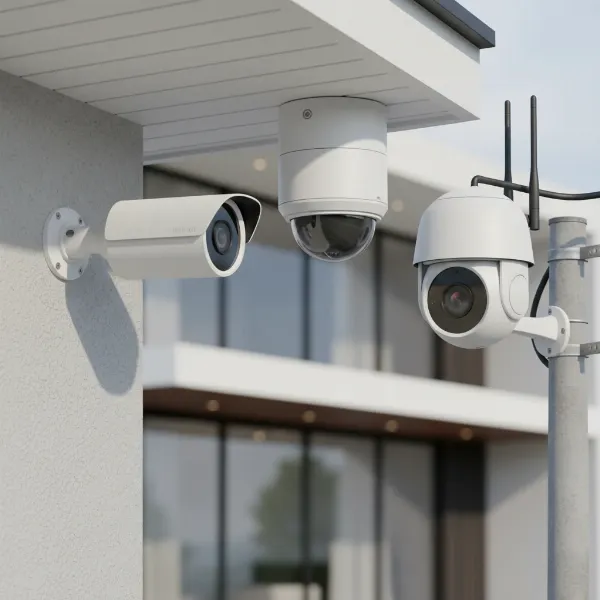 Various types of outdoor cameras including bullet, dome, and PTZ models for home security
By Features:
- Infrared (IR) Cameras: Essential for night vision, these cameras are equipped with IR LEDs that emit light invisible to the human eye, illuminating dark areas to capture clear black-and-white footage in low-light or no-light conditions. The range of IR illumination varies between models.
- Zoom Cameras: Featuring optical or digital zoom capabilities, these cameras allow users to magnify specific areas of interest without sacrificing image clarity (optical zoom) or with some loss of quality (digital zoom). This is particularly useful for identifying distant objects or faces.
- PTZ (Pan-Tilt-Zoom) Cameras: These advanced cameras offer motorized controls, allowing users to remotely pan (move horizontally), tilt (move vertically), and zoom the lens. PTZ cameras are highly versatile for covering large areas and tracking moving subjects, often with programmable patrol routes.
- Cameras with Microphones and Speakers (Two-Way Audio): Integrated microphones and speakers enable two-way communication through the camera. This feature is excellent for interacting with visitors, deterring intruders with verbal warnings, or even communicating with delivery personnel when you’re not home.
By Shape:
- Bullet Cameras: Easily recognizable by their cylindrical shape, bullet cameras are typically mounted on walls or ceilings and are highly visible, acting as a strong deterrent. They usually offer a fixed field of view and are robustly built to withstand outdoor elements.
- Dome Cameras: Characterized by their discreet, dome-shaped casing, these cameras are often vandal-resistant and less conspicuous. They can be mounted on ceilings or walls and their adjustable lens within the dome allows for flexible viewing angles, making it difficult for intruders to determine the camera’s direction.
- Turret Cameras (Eyeball Cameras): A hybrid between bullet and dome, turret cameras feature a ball-and-socket design within a compact housing, offering flexible manual adjustment without the dome cover. They provide excellent night vision, often without the IR reflection issues sometimes seen in dome cameras.
Each camera type presents distinct advantages and disadvantages, and the best choice ultimately depends on your specific security objectives, environmental factors, and budget.
Outdoor Camera Comparison Table
Choosing the right outdoor camera involves weighing several key specifications against your security needs. This comparison table highlights critical criteria to consider when evaluating different types of outdoor cameras.
| Feature | Analog Cameras | IP Cameras (Wired) | IP Cameras (Wireless) | PTZ Cameras |
|---|---|---|---|---|
| Resolution | Up to 8MP (HD-TVI/CVI/AHD) | Up to 4K (8MP+) | Up to 4K (8MP+) | Varies, often 2MP to 8MP |
| Field of View | Fixed, lens dependent | Fixed/Vari-focal, lens dependent | Fixed/Vari-focal, lens dependent | Wide (Pan/Tilt adjustable) |
| Weather Resistance | Good (IP66 rated common) | Excellent (IP66/IP67 rated common) | Good (IP65/IP66 rated common) | Good (IP66 rated common) |
| Night Vision | IR up to 100ft+ | IR/Starlight up to 200ft+ | IR/Starlight up to 100ft+ | IR/Starlight, follows view |
| Smart Features | Basic motion detection | Advanced analytics (AI, facial recognition) | Advanced analytics (AI, facial recognition) | Auto-tracking, tour paths, advanced analytics |
| Storage | DVR, HDD | NVR, Cloud, SD Card | Cloud, SD Card | NVR, Cloud, SD Card |
| Installation | Moderate (cabling) | Moderate (cabling, networking) | Easy (flexible placement) | Complex (precise setup for movement) |
| Cost | Low to Moderate | Moderate to High | Moderate | High |
This table provides a general overview; specific models and features may vary.
Important Criteria When Choosing an Outdoor Camera
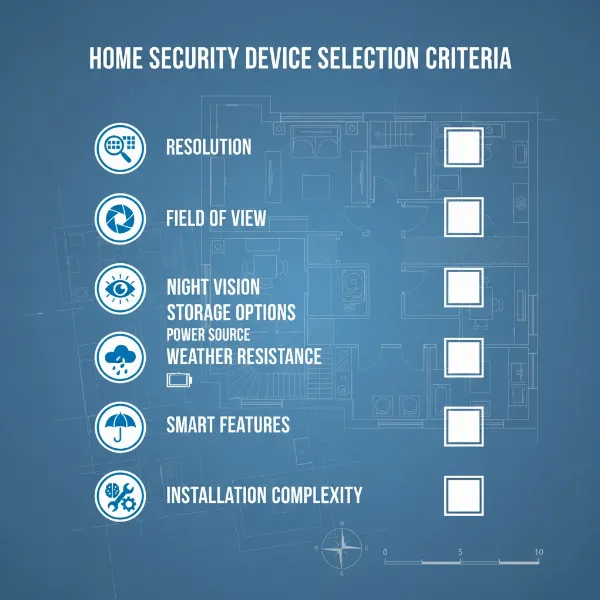
Selecting an outdoor camera requires careful consideration of various factors to ensure it meets your specific security requirements and budget. Here’s a detailed guide on what to look for:
Resolution
The clarity of your camera’s footage is paramount for identification purposes.
- 720p (HD): Basic clarity, suitable for general monitoring.
- 1080p (Full HD): Standard for most modern cameras, offering good detail.
- 2K (1440p): Enhanced detail, especially useful for larger areas.
- 4K (2160p/8MP): Provides the highest level of detail, excellent for capturing fine features and covering expansive spaces, allowing for significant digital zoom without excessive pixelation. Aim for at least 1080p for clear identification.
Field of View (FoV)
This refers to how wide an area the camera can see.
- Wide-angle lenses (e.g., 100-150 degrees): Ideal for covering broad areas like driveways or backyards with a single camera.
- Narrower lenses (e.g., 60-90 degrees): Better for focused surveillance of entry points or specific objects. Some cameras offer vari-focal lenses, allowing you to manually adjust the FoV. PTZ cameras offer the ultimate flexibility in covering vast areas.
Weather Resistance
Outdoor cameras must endure harsh environmental conditions.
- IP Rating: Look for an IP (Ingress Protection) rating, typically IP65, IP66, or IP67.
- IP65: Dust tight, protected against low-pressure water jets from any direction.
- IP66: Dust tight, protected against powerful water jets.
- IP67: Dust tight, protected against immersion in water up to 1 meter for 30 minutes.
Higher numbers indicate better protection against dust and water. Ensure the camera can withstand rain, snow, extreme temperatures, and direct sunlight.
Night Vision
Effective surveillance doesn’t stop when the sun goes down.
- Infrared (IR): Most common, provides black-and-white video in total darkness. Look for the effective range (e.g., 30-100 feet).
- Color Night Vision (Starlight/Full-Color): Cameras with large apertures and advanced sensors can capture color video in very low light conditions, offering more detailed and informative footage. Some models use spotlights to illuminate the area for color vision.
Smart Features
Modern cameras offer intelligent functionalities that enhance security.
- Motion Detection: Triggers recording and alerts upon detecting movement.
- Person/Vehicle Detection: Distinguishes between people, vehicles, and other moving objects (like animals or swaying branches) to reduce false alarms.
- Facial Recognition: Identifies known individuals.
- Activity Zones: Allows you to define specific areas for motion detection, ignoring irrelevant activity outside those zones.
- Two-Way Audio: Enables communication through the camera.
- Siren/Spotlight: Built-in deterrents that can activate upon detection.
Storage
Where your footage is saved is critical for review and evidence.
- Local Storage (SD Card/NVR/DVR): Stores footage directly on the device or a local recorder. Offers privacy and no subscription fees.
- Cloud Storage: Uploads footage to secure servers. Provides off-site backup, accessible from anywhere, but often requires a subscription. Many systems offer a combination of both.
Power
Consider how the camera will receive power.
- Wired (Power Adapter): Requires an electrical outlet nearby.
- PoE (Power over Ethernet): Uses an Ethernet cable to deliver both power and data, simplifying wiring.
- Battery-Powered: Offers maximum flexibility in placement but requires periodic recharging or battery replacement. Solar panel accessories can extend battery life indefinitely in sunny areas.
“The true value of an outdoor camera lies not just in its ability to record, but in its intelligent features that proactively alert you to what truly matters.” – Jane Doe, Lead Security Analyst at SecureView Solutions
Top 5 Outdoor Cameras Today
While specific models constantly evolve, the best outdoor cameras on the market consistently excel in a few key areas: superior image quality, robust weather resistance, advanced smart features, and reliable connectivity. When looking for a top-tier outdoor camera, you are typically seeking a device that offers a blend of these attributes to provide comprehensive and dependable surveillance.
-
High-Resolution IP Camera with Starlight Night Vision:
- Brand: Leading security brands.
- Pros: Delivers crystal-clear 4K resolution, even in challenging lighting. Advanced Starlight sensors provide color night vision in very low light. Features AI-powered person and vehicle detection, activity zones, and two-way audio. Often supports PoE for simplified installation and comes with cloud and local storage options.
- Cons: Higher price point. Requires network knowledge for optimal setup.
- Price: Premium segment.
- User Reviews: Highly praised for image clarity and reliable smart alerts.
-
Wireless Battery-Powered Camera System:
- Brand: Consumer electronics and smart home security companies.
- Pros: Extremely easy to install with no wiring required, offering flexible placement anywhere within Wi-Fi range. Long-lasting rechargeable batteries, often compatible with solar panels. Includes 1080p or 2K video, motion detection, and two-way audio. Ideal for renters or temporary surveillance.
- Cons: Battery life can vary based on activity; some advanced features might require a subscription.
- Price: Mid-range.
- User Reviews: Popular for ease of use and portability, though some users note occasional connectivity issues.
-
PTZ Camera with Auto-Tracking:
- Brand: Professional surveillance equipment manufacturers.
- Pros: Covers vast areas with pan, tilt, and powerful optical zoom capabilities. Auto-tracking intelligently follows detected subjects. Features high resolution (e.g., 5MP), strong IR night vision, and robust weatherproofing. Excellent for large properties or commercial use.
- Cons: Significantly more expensive. Complex installation and configuration.
- Price: High-end professional.
- User Reviews: Valued for comprehensive coverage and advanced tracking, but typically for users with specific, demanding needs.
-
Bullet Camera with AI-Powered Perimeter Protection:
- Brand: Enterprise and prosumer security brands.
- Pros: Durable and highly visible, acting as a strong deterrent. Offers superior 2K or 4K resolution with excellent IR night vision. Advanced AI can distinguish between human intrusion, line crossing, and object left/removed, minimizing false alarms. Often supports PoE and various storage options.
- Cons: Fixed viewing angle means multiple cameras might be needed for full coverage.
- Price: Moderate to High.
- User Reviews: Appreciated for robust build quality and highly accurate intelligent detection.
-
Budget-Friendly Dome Camera with Local Storage:
- Brand: Value-focused electronics manufacturers.
- Pros: Discreet design, often vandal-resistant. Offers 1080p Full HD video with basic IR night vision. Typically supports local storage via an SD card, avoiding monthly fees. Easy to install and manage via a simple app.
- Cons: May lack advanced AI features and high-end weather resistance. Cloud storage often comes at an extra cost.
- Price: Entry-level to Low-Mid range.
- User Reviews: Praised for affordability and basic reliable surveillance for common areas.
When considering any of these types, always check the specific model’s IP rating, customer reviews for real-world performance, and the manufacturer’s warranty and support.
Outdoor Camera Installation Guide
Proper installation is crucial for your outdoor camera’s performance, longevity, and effectiveness. A poorly installed camera can be vulnerable to theft, damage, or provide an inadequate view. Here’s a step-by-step guide to help you set up your system safely and efficiently.
-
Choose the Optimal Location:
- Height: Mount cameras 8-10 feet (2.4-3 meters) above the ground to deter tampering while still capturing clear facial features.
- Coverage: Position cameras to cover key entry points (doors, windows, garage), high-value assets (driveways, vehicles), and blind spots.
- Line of Sight: Ensure a clear, unobstructed view of the target area. Avoid direct sunlight into the lens, which can cause glare and washed-out images.
- Protection: Whenever possible, choose locations under eaves or overhangs to provide extra protection from direct weather exposure.
- Power/Network Access: Consider proximity to power outlets and network access points (for wired or Wi-Fi cameras).
-
Gather Necessary Tools and Materials:
- Drill with appropriate bits for mounting surfaces (wood, brick, concrete).
- Screws and wall anchors suitable for outdoor use.
- Screwdriver.
- Ladder.
- Pencil for marking.
- Cable ties or clips (for wired cameras).
- Weatherproof junction boxes (if making outdoor electrical connections).
- The camera itself, mounting bracket, power adapter, and any necessary cables.
-
Mount the Camera:
- Marking: Hold the camera’s mounting bracket against the chosen surface and mark the drill holes with a pencil.
- Drilling: Drill pilot holes at the marked spots. For masonry or concrete, insert wall anchors.
- Securing: Attach the mounting bracket firmly to the surface using the provided screws.
- Attaching Camera: Secure the camera to its bracket according to the manufacturer’s instructions.
-
Connect to Power and Network:
- Wired Cameras: Route power and Ethernet cables (if PoE) from the camera to their respective connections (outlet, router, NVR). Use waterproof cable glands and outdoor-rated cables.
- Wireless Cameras: If battery-powered, ensure batteries are charged. If wired for power but wireless for data, connect the power adapter to an outdoor-rated outlet, ensuring it’s protected from the elements. Confirm Wi-Fi signal strength at the camera’s location.
-
Configure and Adjust:
- App Setup: Download the camera’s companion app and follow the on-screen instructions to connect the camera to your Wi-Fi network or recorder.
- Live View: Use the app’s live view to fine-tune the camera’s angle and focus.
- Settings: Configure motion detection zones, sensitivity, alert preferences, and recording schedules. Test two-way audio if available.
- Firmware: Check for and install any available firmware updates to ensure optimal performance and security.
-
Final Test:
- Walk Test: Walk through the detection zones to confirm the camera triggers alerts and records correctly.
- Night Vision: Test night vision after dark to ensure clear imagery.
- Connectivity: Verify remote viewing functionality from outside your home network.
A well-installed camera not only functions better but also lasts longer, providing reliable security for years to come.
Tips for Using and Maintaining Outdoor Cameras
To ensure your outdoor cameras provide consistent, high-quality surveillance and have a long lifespan, regular use and maintenance are essential. Neglecting these simple steps can lead to degraded performance, false alarms, or even system failure.
Clean Your Camera Regularly
Dust, dirt, spiderwebs, and water spots can obstruct the lens and infrared sensors, significantly impacting image quality and night vision.
- Lens: Gently wipe the lens with a soft, clean, lint-free cloth, possibly dampened with a bit of lens cleaner. Avoid abrasive materials that could scratch the lens.
- Housing: Clean the camera body and housing with a damp cloth to remove accumulated dirt.
- Frequency: Depending on your environment (e.g., dusty areas, coastal regions), clean your cameras every 1-3 months.
Check Connections and Power Periodically
Loose connections are a common cause of intermittent recording or complete camera failure.
- Cables: Inspect all wired connections for fraying, cracks, or corrosion, especially where they connect to the camera or power source. Ensure they are securely plugged in.
- Power Supply: Verify that power adapters are functioning correctly and that there’s no visible damage.
- Wireless Signal: For Wi-Fi cameras, regularly check the signal strength in the camera’s app. If it’s weak, consider repositioning your router or adding a Wi-Fi extender.
- Battery Life: For battery-powered cameras, monitor battery levels via the app and recharge or replace batteries as needed.
Update Camera Firmware
Manufacturers frequently release firmware updates to improve performance, add new features, fix bugs, and patch security vulnerabilities.
- Automatic Updates: Enable automatic firmware updates in your camera’s settings if available.
- Manual Checks: If not, periodically check the manufacturer’s website or the camera app for new firmware versions and follow the instructions to install them.
- Security: Keeping firmware up-to-date is crucial for protecting your camera system from cyber threats.
Protect Your Camera from Physical Impacts
While outdoor cameras are built to be robust, they are not indestructible.
- Vandalism: If your area has a risk of vandalism, consider dome cameras (which are harder to tamper with) or add protective enclosures.
- Environmental Factors: Ensure cameras are mounted securely to withstand strong winds. If possible, position them under eaves or other overhangs to shield them from direct harsh weather, like heavy rain or hail.
- Obstructions: Regularly trim tree branches or bushes that might grow into the camera’s field of view or obscure its vision.
By adhering to these simple maintenance tips, you can significantly extend the life of your outdoor cameras and ensure they continue to provide reliable, high-quality surveillance for your property.
Buying Guide: What to Know Before Purchasing an Outdoor Camera
Before committing to an outdoor camera, a strategic approach will help you navigate the myriad of options and ensure your investment aligns perfectly with your security goals. Beyond the technical specifications, consider these overarching points to make a smart buying decision.
Projected Budget
Security camera systems range widely in price, from under $50 for basic wireless models to thousands for professional-grade multi-camera setups.
- Entry-Level: Offers essential motion detection and 1080p video, often with local storage.
- Mid-Range: Adds features like 2K/4K resolution, better night vision, person detection, and optional cloud storage.
- High-End: Includes advanced AI, PTZ capabilities, robust weatherproofing, and comprehensive system integration.
Set a realistic budget, but be prepared to invest more for crucial features like higher resolution and intelligent analytics that genuinely enhance security.
Specific Usage Needs
Your environment and primary security concerns should dictate your choice.
- Home Security: Are you monitoring a front door, backyard, or an entire perimeter? This influences the number of cameras and their field of view.
- Business Surveillance: Do you need to monitor entrances, parking lots, or specific high-traffic areas? Commercial needs often require more robust, integrated systems.
- Property Size: Larger properties may benefit from PTZ cameras or multiple fixed cameras for complete coverage.
- Threat Assessment: Are you primarily deterring petty theft, or do you need sophisticated monitoring for more serious threats?
Essential Features
Prioritize features that directly address your security concerns.
- Resolution: At least 1080p for clear identification; 2K or 4K if fine details are crucial.
- Night Vision: Reliable IR or color night vision is non-negotiable for 24/7 surveillance.
- Weather Resistance: An IP66 or IP67 rating is essential for outdoor durability.
- Smart Alerts: Person/vehicle detection minimizes false alarms.
- Storage Options: Local (SD card/NVR) for privacy, cloud for remote access and backup.
Reputable Brands
Opting for well-known and established brands in the security camera industry typically ensures better product quality, reliability, customer support, and consistent software updates.
- Research: Look for brands with positive reviews, a strong warranty, and responsive technical support.
- Ecosystem: Consider if the camera integrates with other smart home devices you own.
Warranty and Support
A good warranty provides peace of mind and protection against manufacturing defects.
- Warranty Period: Understand the length and terms of the warranty.
- Customer Support: Check the availability and quality of customer service. Can you easily get help if you encounter issues with installation or operation?
By systematically addressing these points, you can confidently select an outdoor camera that serves as a dependable sentinel for your property, providing vigilant oversight and invaluable security for years to come.
Conclusion
The evolution of outdoor camera technology has transformed property security, offering powerful tools to protect what matters most. From deterring potential threats to providing crucial evidence, these devices are indispensable for modern safety strategies. Whether you opt for a high-resolution IP camera, a flexible wireless system, or an advanced PTZ model, understanding the nuances of weather resistance, night vision capabilities, and smart features is key to making the right choice. By carefully considering your specific needs, budget, and the comprehensive criteria outlined in this guide, you can confidently select an outdoor camera that delivers optimal performance and unwavering peace of mind. Are you ready to fortify your property with intelligent surveillance?
Frequently Asked Questions
How high should I mount my outdoor camera for optimal security?
The ideal mounting height for an outdoor camera is typically between 8 to 10 feet (2.4 to 3 meters) above the ground. This height is sufficient to capture clear facial features and activity while being high enough to deter tampering and prevent easy access by intruders. Positioning it under an eave also provides additional weather protection.
Do all outdoor cameras require a Wi-Fi connection?
No, not all outdoor cameras require a Wi-Fi connection. While many modern outdoor cameras are wireless and rely on Wi-Fi for data transmission and remote access, wired IP cameras connect via Ethernet cables, and analog cameras use coaxial cables. Battery-powered cameras may use Wi-Fi, but some cellular-enabled cameras can operate without traditional Wi-Fi by using a mobile network connection.