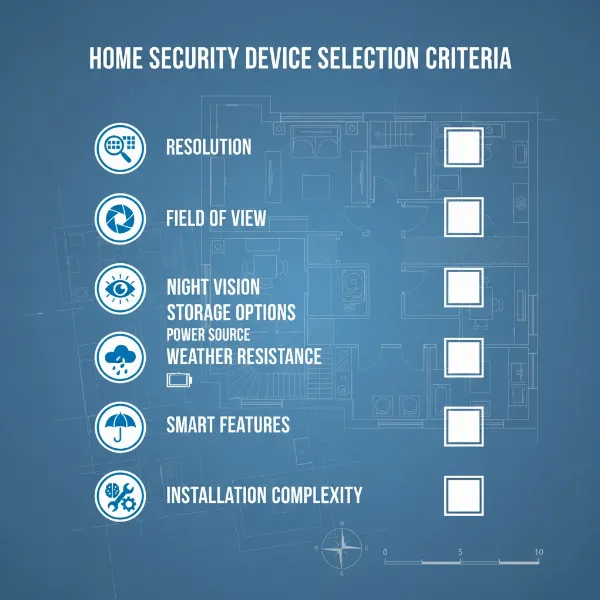
Protecting your property has never been more critical, and outdoor cameras serve as your ever-vigilant sentinels. From deterring potential threats to capturing crucial evidence, these devices are essential for safeguarding your home and business. But with an overwhelming array of options available, navigating the technical specifications and smart features can be a daunting task. This comprehensive guide will dissect the world of outdoor security cameras, offering an honest look at what truly matters, helping you select the perfect guardian for your peace of mind.
Outdoor Cameras: Essential Pillars of Property Security
Outdoor cameras are more than just recording devices; they are a fundamental layer in a robust security strategy, acting as both a deterrent and a powerful investigative tool. They stand guard 24/7, providing surveillance that blankets your property, identifying suspicious activity, and documenting incidents. Statistics consistently show that visible security cameras significantly reduce the likelihood of property crime, making them an indispensable investment for any homeowner or business operator. Their constant vigilance offers not just security, but an invaluable sense of peace.
Popular Types of Outdoor Security Cameras
The market offers a diverse range of outdoor cameras, each designed with specific applications and environments in mind. Understanding these variations, from their core technology to their form factor and specialized features, is crucial for making an informed choice.
By Technology:
- Analog Cameras: These traditional cameras transmit video over coaxial cables to a Digital Video Recorder (DVR). While generally more affordable, their resolution is typically lower than modern IP cameras. They are simple to set up but lack advanced smart features.
- IP Cameras (Internet Protocol): The modern standard, IP cameras transmit digital video data over a network, often using Power-over-Ethernet (PoE) for a single-cable power and data solution. They offer high resolutions (1080p, 2K, 4K), advanced analytics, and remote access via apps.
- Wireless Cameras (Wi-Fi): These cameras connect to your home Wi-Fi network, offering flexible placement without extensive wiring for data. Many are battery-powered, making installation even easier, though battery life and Wi-Fi signal strength are key considerations.
|
Our Picks for the Best Outdoor camera in 2026
As an Amazon Associate I earn from qualifying purchases.
|
||
| Num | Product | Action |
|---|---|---|
| 1 | Ring Outdoor Cam (Stick Up Cam), Weather-resistant home or business security camera, outdoor ready, Live View, Color Night Vision, Two-Way Talk, motion alerts, Works with Alexa, White |

|
| 2 | eufy Security 3K Dual Camera, SoloCam S340, Solar Security Cameras Wireless Outdoor, Cameras for Home Security, 360°Coverage, Pan & Tilt, No Blind Spots, No Monthly Fee, HomeBase S380 Compatible |
|
| 3 | Ring Outdoor Cam Plus, Battery (newest model), Home or business security, Wide-Angle 2K Video with Ring Vision, Low-Light Sight for full-color night vision, Mount-Anywhere Versatility, Black |
|
| 4 | Blink Outdoor 4 – Wireless smart security camera, two-year battery life, 1080p HD day and infrared night live view, two-way talk. Sync Module Core included – 3 camera system |
|
| 5 | GMK Security Cameras Wireless Outdoor 4 Pack, 2K Battery Powered Cameras for Home Security, Color Night Vision, Motion Detection, 2-Way Talk, IP65 Waterproof, Remote Access, Cloud/SD Storage |
|
| 6 | Security Cameras Wireless Outdoor 355° Pan Rotating 2K Color Night Vision Cameras for Home Security WiFi Battery Outdoor Camera Motion Detection 2-Way Talk IP65 Spotlight Siren SD/Cloud Storage 2 Pack |
|
| 7 | 2026 Upgraded 2K Security Cameras Wireless Outdoor, Free Cloud Storage, 1-6 Months Battery Life, Waterproof, 2-Way Talk, AI Motion Detection Spotlight Siren Alarm Cameras for Home Security |
|
| 8 | WYZE Cam v4 (Latest Model), 2.5K AI Security Camera, Indoor/Outdoor Cameras for Home Security, Baby Monitor & Pet Camera, Vibrant Color Night Vision, No Subscription Required, Free Expert Help |
|
| 9 | All-new Blink Video Doorbell + Outdoor 4 – Wireless smart security cameras, head-to-toe HD view, two-year battery life. Sync Module Core included – 2 camera system + Video Doorbell |
|
| 10 | aosu Security Cameras Outdoor Wireless, 4 Cam-Kit, No Subscription Required, Solar-Powered, Home Security Cameras System with 360° Pan & Tilt, Auto Tracking, 2K Color Night Vision, Easy Setup |
|
By Features:
- Infrared (IR) Cameras: Equipped with IR LEDs, these cameras provide clear black-and-white footage in complete darkness, essential for 24/7 monitoring.
- Zoom Cameras: Featuring optical or digital zoom, these allow you to magnify areas of interest, helping to identify distant details like faces or license plates.
- PTZ (Pan-Tilt-Zoom) Cameras: These offer unparalleled control, allowing users to remotely adjust the camera’s horizontal (pan), vertical (tilt) angle, and zoom in on specific areas. They are ideal for monitoring large spaces dynamically.
- Cameras with Microphones and Speakers (Two-Way Audio): Enabling real-time communication, these cameras allow you to speak to visitors or deter intruders directly through the camera’s app.
By Form Factor:
- Bullet Cameras: Cylindrical in shape, bullet cameras are highly visible and often used for long-range viewing, making them effective deterrents for driveways or building perimeters. They are generally easier to install on walls or ceilings.
- Dome Cameras: Designed with a dome-shaped casing, these are more discreet and often vandal-resistant. Their wide-angle views make them suitable for entry points or high-security areas where a less intrusive presence is desired.
- Turret Cameras: Sometimes called “eyeball” cameras, these combine elements of both bullet and dome cameras. They offer a flexible ball joint for easy aiming, often providing discreet yet effective coverage without the dome’s glare issues.
Each type comes with its own set of advantages and potential drawbacks. For example, while PTZ cameras offer broad coverage with a single unit, they might require manual adjustment to capture specific events, unlike a fixed wide-angle camera. Wireless cameras simplify installation, but their reliance on battery life and Wi-Fi signal can be a limitation in some scenarios.
Comparing Popular Outdoor Camera Types
Choosing the right outdoor camera involves weighing various specifications against your unique needs. This comparison table highlights critical factors to help you understand the differences at a glance.
| Feature | Analog Cameras | IP Cameras (Wired/PoE) | Wireless Cameras (Wi-Fi/Battery) | PTZ Cameras |
|---|---|---|---|---|
| Resolution | Lower (720p, 1080p max) | High (1080p, 2K, 4K, 8K) | Varied (1080p, 2K, 4K) | High (1080p, 2K, 4K) |
| Field of View | Fixed, typically narrower | Fixed or vari-focal, wide-angle | Fixed or wide-angle | 360° pan, 90°+ tilt, zoom |
| Weather Rating | Good (IP66/IP67) | Excellent (IP66/IP67/IK10) | Good (IP65/IP66) | Good (IP66/IP67) |
| Night Vision | Basic IR (B&W) | Advanced IR, Color Night Vision | IR, some Color Night Vision | Advanced IR, Color Night Vision |
| Smart Features | Limited/None | Advanced AI (person, vehicle, package detection, activity zones) | Basic to advanced AI | Advanced AI, auto-tracking |
| Storage | DVR local | NVR local, Cloud, SD card | Cloud, SD card, some local hubs | NVR local, Cloud, SD card |
| Power | Wired (coaxial + power) | Wired (PoE or separate power) | Battery, Solar, Wired | Wired (PoE or separate power) |
| Installation | Moderate (cabling) | Moderate (Ethernet cabling) | Easy (minimal wiring) | Complex (precise wiring for control) |
| Cost | Low | Medium to High | Medium | High |
| Reliability | High (wired) | Very High (wired) | Moderate (Wi-Fi, battery) | High (wired) |
Key Criteria for Selecting Your Outdoor Camera
Choosing the ideal outdoor camera involves a careful assessment of several technical specifications and practical features to ensure it meets your specific security requirements and budget.
Resolution
The clarity of your camera’s footage is paramount for identification.
- 1080p (Full HD): Suitable for general surveillance and most residential needs, offering clear images.
- 2K/3MP/4MP: Provides enhanced detail, making it easier to discern faces or license plates, especially when zooming in.
- 4K/8MP (Ultra HD): Offers the highest level of detail, ideal for covering large areas with fewer cameras or for critical identification purposes. A higher resolution sensor reduces the number of cameras needed for full site coverage.
Field of View (FOV)
This refers to the area your camera can capture.
- Wide-angle lenses (100° or more): Best for covering broad areas like yards, driveways, or parking lots, minimizing the total number of cameras required.
- Narrower FOV: More suited for specific points of interest, such as doorways or gates. Some cameras feature 180-degree panoramic views, further reducing blind spots.
Weather Resistance
Outdoor cameras must endure diverse environmental conditions. Look for an Ingress Protection (IP) rating.
- IP65: Protected against dust and low-pressure water jets, suitable for moderate weather.
- IP66/IP67: Offers resistance against high-pressure water or temporary submersion, ideal for harsh climates with heavy rain or snow.
- Operating Temperature: Check the camera’s specified operating temperature range to ensure it can withstand local extremes (e.g., -4°F to 120°F).
Night Vision
Effective surveillance means 24/7 capability, even in darkness.
- Infrared (IR) Night Vision: The most common type, providing clear black-and-white footage in complete darkness. The range can vary from 30 to over 100 feet.
- Color Night Vision: Achieved through integrated spotlights or advanced low-light sensors, these cameras can capture full-color images even at night, offering superior detail and context.
Smart Features
Modern cameras go beyond basic recording with intelligent functionalities.
- Motion Detection: Triggers recording only when movement is detected, saving storage. Advanced systems allow for customizable activity zones to reduce false alerts.
- AI Detection (Person, Vehicle, Animal, Package): AI-powered analytics can differentiate between different types of motion, sending more relevant alerts and significantly reducing notifications caused by swaying branches or small animals.
- Two-Way Audio: A built-in microphone and speaker allow you to listen in and speak through the camera, acting as an intercom or a verbal deterrent.
- Integrated Spotlights/Sirens: Some cameras include powerful lights that illuminate intruders or loud sirens to scare them off, enhancing deterrence.
Storage Options
How your footage is saved is a critical consideration for review and evidence.
- Local Storage (MicroSD card, DVR/NVR): Footage is stored directly on a card in the camera or a dedicated recording device. This offers security and avoids subscription fees, but media can be lost or stolen.
- Cloud Storage: Footage is uploaded to secure remote servers, accessible from anywhere. This typically requires a monthly subscription but provides off-site backup and protection against physical damage or theft of local media.
Power Source
Consider the logistics of providing power to your camera.
- Wired (AC, PoE): Offers reliable, continuous power. Power over Ethernet (PoE) simplifies installation by delivering both power and data over a single Ethernet cable.
- Wireless (Battery): Easiest to install, offering maximum flexibility in placement. Battery life varies significantly and can be affected by cold weather or frequent activity.
- Solar-Powered: Eco-friendly and cost-effective, using a solar panel to keep batteries charged, ideal for remote locations without easy access to power outlets.
Top 5 Outdoor Cameras on the Market (2024-2026)
The outdoor camera market is highly competitive, with innovation driving new features and improved performance year after year. Here are 5 highly-rated models that consistently stand out for their blend of features, reliability, and value.
1. Arlo Pro 5S 2K
- Brand: Arlo
- Pros: Sharp 2K HDR video, dual-band Wi-Fi (2.4GHz & 5GHz) for strong connectivity, integrated spotlight for color night vision, 160-degree field of view, excellent app and notification quality, battery-powered for versatile placement.
- Cons: Requires an Arlo Secure subscription for full smart features (e.g., smart detection, rich video history).
- Price: Premium segment.
- User Reviews: Praised for its robust performance, clear images, and reliable alerts, making it a favorite for those seeking a premium wireless experience.
2. Google Nest Cam (Battery) 2nd Gen
- Brand: Google Nest
- Pros: Versatile for indoor/outdoor use, 1080p HD video with a 130-degree field of view, intelligent alerts (person, vehicle, animal detection) included free for 3 hours of event video history, battery-powered with optional wiring, local video storage if Wi-Fi goes down.
- Cons: No 5GHz Wi-Fi support, requires a Nest Aware subscription for continuous recording and extended video history, not ideal if wired for aesthetic reasons.
- Price: Mid-range.
- User Reviews: Highly regarded for its smart features and ease of use within the Google ecosystem, offering substantial value even without a subscription.
3. Eufy SoloCam S340 / EufyCam 3 (S330)
- Brand: Eufy
- Pros: Sharp 3K/4K resolution, dual camera lenses (S340 for wide and telephoto views), solar-powered for virtually unlimited battery life, local video storage (often 8GB built-in or via HomeBase 3), color night vision, mechanical pan and tilt (S340), AI smarts (person, vehicle detection) without mandatory subscription.
- Cons: Some models require a HomeBase for advanced features or expanded storage, pan/tilt functions can be slower than dedicated PTZ units.
- Price: Mid to Premium-range (depending on model/kit).
- User Reviews: Appreciated for its strong feature set, high resolution, and the appeal of no monthly fees for core functionalities, especially the solar charging capability.
4. Blink Outdoor 4
- Brand: Blink (Amazon)
- Pros: Excellent budget-friendly option, compact and easy to install, 1080p HD video, up to two-year battery life on two AA batteries, improved night vision over previous generations, person detection with subscription.
- Cons: Basic features without a subscription, lower resolution compared to premium models, relies on a Sync Module for connectivity.
- Price: Budget-friendly.
- User Reviews: Praised for its simplicity, long battery life, and affordability, making it a great choice for basic, reliable outdoor coverage, particularly for Alexa users.
5. Ring Floodlight Cam Wired Plus / Pro
- Brand: Ring
- Pros: Integrates security camera with powerful LED floodlights (2000-3000 lumens), 1080p HD video with 140-degree field of view, color night vision (Plus), advanced 3D Motion Detection with radar (Pro), two-way audio, acts as a strong deterrent.
- Cons: Wired installation required, subscription (Ring Protect) needed for video history and smart alerts, Floodlight Cam Plus lacks 5GHz Wi-Fi.
- Price: Mid to Premium-range.
- User Reviews: Highly effective as a combined lighting and security solution, particularly for high-traffic areas where strong deterrence and illumination are key.
Guide to Installing Your Outdoor Camera
Proper installation is crucial for optimal performance and longevity of your outdoor camera system. Follow these steps to ensure a secure and effective setup.
-
Choose the Optimal Location:
- Height: Install cameras at 8-10 feet (2.5-3 meters) above ground for a good balance of wide coverage and facial recognition, while keeping them out of easy reach.
- Coverage: Aim for a clear line of sight to entry points, driveways, and vulnerable areas. Avoid pointing directly at strong light sources (like the sun) or reflective surfaces to prevent glare.
- Power/Network Access: Ensure proximity to a power outlet or a strong Wi-Fi signal for wireless cameras. For wired cameras, plan your cable routing carefully.
-
Gather Tools and Materials:
- You’ll typically need a drill, screwdriver, ladder, mounting template (often included), appropriate screws and anchors, and potentially cable ties or conduit for wired installations.
-
Mount the Camera:
- Use the mounting template to mark drill holes. Drill pilot holes and insert wall anchors if needed.
- Secure the mounting bracket firmly to the surface.
- Attach the camera to the bracket according to the manufacturer’s instructions.
-
Connect Power and Network:
- Wired Cameras: Connect the power cable and Ethernet (for IP cameras) or coaxial (for analog/HD-over-coax cameras) cables. Ensure connections are weatherproof.
- Wireless Cameras: Insert charged batteries. Power on the camera and connect it to your home Wi-Fi network using the manufacturer’s mobile app.
-
Configure and Adjust:
- Open the camera’s mobile app and follow the setup wizard.
- Adjust the camera’s angle and field of view using the live feed to ensure comprehensive coverage.
- Set up motion detection zones, sensitivity, and alert preferences to minimize false alarms.
- Configure night vision settings and two-way audio if available.
-
Test the System:
- Walk through the detection zones to test motion sensing and alert notifications.
- Check the live feed and recorded footage quality both during the day and at night.
- Ensure two-way audio functions correctly.
A well-planned installation not only enhances security but also simplifies future maintenance and troubleshooting.
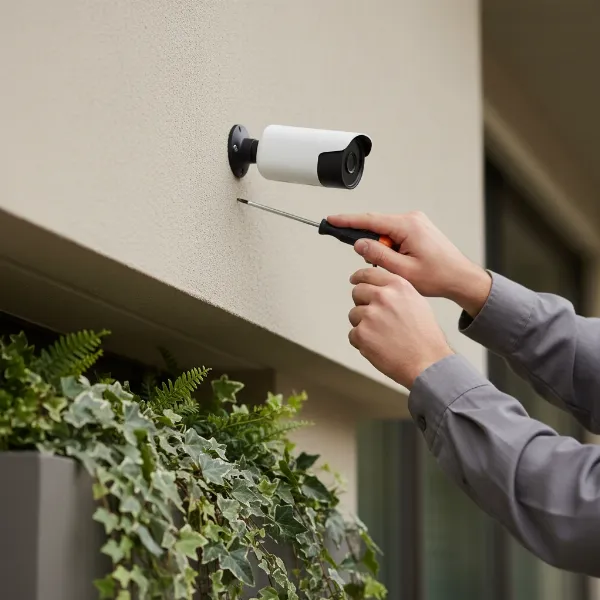 A person installing an outdoor security camera on a house wall at eye level, showing careful alignment and connection of wires.
Tips for Using and Maintaining Your Outdoor Camera
To ensure your outdoor security cameras provide long-lasting, reliable performance, regular care and proactive maintenance are essential. These simple tips can help extend their lifespan and maintain optimal functionality.
- Regular Cleaning: Over time, dust, dirt, spiderwebs, and water spots can obscure the camera lens, degrading image quality. Gently wipe the lens and casing with a soft, damp cloth every few months, or more frequently if exposed to harsh elements.
- Check Connections and Power: Periodically inspect all wired connections for corrosion or damage. For battery-powered cameras, monitor battery levels regularly and recharge or replace them as needed. For solar-powered units, ensure the solar panel is clean and free from obstructions.
- Firmware Updates: Camera manufacturers frequently release firmware updates to improve performance, add new features, and patch security vulnerabilities. Check your camera’s app or the manufacturer’s website for available updates and install them promptly.
- Protect from Physical Damage: While outdoor cameras are built to be durable, extreme weather events (like hail) or accidental impacts can cause damage. Consider installing protective covers or ensuring the camera is in a somewhat sheltered location if possible.
- Review Settings Periodically: Revisit your camera’s settings, especially motion detection zones and sensitivity. Overgrown foliage or new outdoor decor might trigger false alerts, requiring adjustments to maintain efficiency.
Adhering to these maintenance practices will help you get the most out of your outdoor camera investment, providing consistent and clear surveillance for years to come.
Buying Guide: What to Know Before You Buy an Outdoor Camera
Before committing to an outdoor camera system, it’s wise to take a step back and assess your specific needs, budget, and desired features. This strategic approach ensures you invest in a solution that truly enhances your security.
- Define Your Budget: Outdoor cameras range significantly in price. Determine a realistic budget that accommodates not just the camera hardware but also any potential accessories (e.g., solar panels, longer cables) and recurring subscription fees for cloud storage or advanced AI features.
- Assess Specific Needs:
- What areas do you need to monitor (e.g., front door, backyard, driveway, garage)?
- Do you need to identify faces or license plates clearly (requiring higher resolution)?
- Is 24/7 recording essential, or are motion-triggered alerts sufficient?
- Do you require two-way audio for communication?
- Are there existing smart home systems you want the camera to integrate with (e.g., Alexa, Google Assistant)?
- Prioritize Essential Features: Based on your needs, make a list of “must-have” features versus “nice-to-have” ones. For instance, in a rainy climate, a high IP rating is a must, while color night vision might be a “nice-to-have” if basic IR is sufficient.
- Research Reputable Brands: Stick to established brands known for reliability, customer support, and regular software updates. Brands like Arlo, Google Nest, Eufy, Ring, and Blink have proven track records in the security camera space.
- Understand Warranty and Support: Check the manufacturer’s warranty period and review their customer support options. Good support can be invaluable if you encounter any technical issues or need assistance with setup.
- Consider Data Privacy: Be aware of how your chosen camera system handles your video data. Look for features like local storage options, encryption, and clear privacy policies.
- Installation Complexity: Decide if you prefer a simple DIY battery-powered camera or are comfortable with the more involved installation of a wired or PoE system.
By thoroughly considering these points, you can confidently navigate the options and select an outdoor camera that offers the best blend of performance, features, and value for your property.
Conclusion
Selecting the right outdoor camera involves more than just picking a device; it’s about investing in a reliable guardian that aligns with your specific security needs and technical preferences. We’ve explored the diverse types, critical specifications from resolution to weather resistance, and highlighted top contenders on the market. From the crisp 4K detail of a high-end Eufy to the versatile battery power of an Arlo or Nest Cam, and the powerful deterrence of a Ring Floodlight Cam, there’s an outdoor camera designed for every scenario. By understanding these key specs and features, you are now equipped to make an informed decision that brings robust protection and peace of mind to your home or business. What aspect of outdoor camera technology are you most excited to integrate into your security setup?
Frequently Asked Questions
What resolution is best for an outdoor security camera?
For general surveillance, 1080p (Full HD) is suitable, but 2K or 4K resolution is recommended for critical identification tasks like recognizing faces or license plates, especially when digital zoom is needed. Higher resolution allows for clearer detail and better forensic evidence.
Do outdoor cameras need Wi-Fi?
Many modern outdoor cameras use Wi-Fi for connectivity and remote access. However, wired IP cameras use an Ethernet cable, often with Power over Ethernet (PoE), for a more stable connection, and some older analog systems do not require an internet connection at all.
How long do battery-powered outdoor cameras last?
Battery life varies greatly depending on usage, battery capacity, and environmental factors like temperature. Some can last several months to over a year on a single charge, especially those with solar panel options, while others may require recharging every few weeks with frequent activity.
Can outdoor cameras see in the dark?
Yes, most outdoor security cameras come equipped with night vision capabilities. This typically involves infrared (IR) LEDs that illuminate the scene for clear black-and-white footage in total darkness. More advanced cameras may offer color night vision using built-in spotlights or advanced low-light sensors.
What IP rating should I look for in an outdoor camera?
For reliable outdoor use, look for an IP (Ingress Protection) rating of at least IP65, which protects against dust and low-pressure water jets. For harsher climates with heavy rain or snow, an IP66 or IP67 rating offers superior protection against powerful water jets or even temporary submersion.