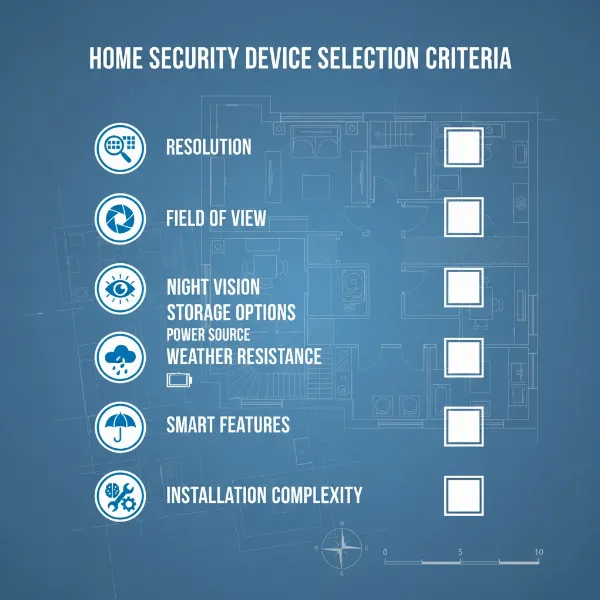
Securing your home or business has never been more critical, and outdoor cameras stand as your first line of defense against potential threats. With an array of options flooding the market, choosing the ideal outdoor security camera can seem daunting. This comprehensive guide simplifies the process, equipping you with the knowledge to navigate through the features, types, and installation nuances, ensuring you find the perfect surveillance solution to safeguard your property and loved ones.
Outdoor Cameras: Essential Security Solutions
Outdoor cameras are indispensable tools in modern security strategies, offering peace of mind by acting as both a deterrent and a crucial evidence collector. These devices provide continuous surveillance of your property’s perimeter, alerting you to suspicious activities the moment they occur. Studies consistently show that visible camera installations can significantly reduce crime rates, deterring potential intruders before any harm is done. For instance, some research indicates a notable decrease in retail theft thanks to well-placed camera systems, highlighting their effectiveness in crime prevention. Integrating outdoor cameras into your security plan creates a robust defense, transforming your property into a more secure environment.
Popular Types of Outdoor Cameras
The world of outdoor security cameras is diverse, with various types designed to meet different security needs and preferences. Understanding their distinctions is key to making an informed decision.
Technology-Based Categories
- Wired Cameras: These cameras typically connect via Ethernet (IP cameras) or coaxial cables (analog cameras) to a central recording device. They offer reliable, constant power and a stable connection, reducing the risk of signal loss or battery depletion. While installation can be more complex, often requiring professional setup, their consistent performance is a significant advantage.
- Wireless Cameras: Offering greater installation flexibility, wireless cameras connect to your home network via Wi-Fi, eliminating the need for extensive cabling. Many are battery-powered, making placement incredibly easy, while some utilize solar panels for continuous charging. Cellular wireless cameras are also available for locations without Wi-Fi, though they usually require a separate data plan.
- IP Cameras: These are digital cameras that send and receive video footage over an IP network. They offer higher resolution and advanced features like AI detection, but require a stable internet connection.
- Analog Cameras: Older technology, analog cameras transmit video over coaxial cables to a DVR. They are generally less expensive but offer lower resolution compared to IP cameras.
|
Our Picks for the Best Outdoor camera in 2026
As an Amazon Associate I earn from qualifying purchases.
|
||
| Num | Product | Action |
|---|---|---|
| 1 | Ring Outdoor Cam Plus, Battery (newest model), Home or business security, Wide-Angle 2K Video with Ring Vision, Low-Light Sight for full-color night vision, Mount-Anywhere Versatility, Black |

|
| 2 | Ring Outdoor Cam (Stick Up Cam), Weather-resistant home or business security camera, outdoor ready, Live View, Color Night Vision, Two-Way Talk, motion alerts, Works with Alexa, White |
|
| 3 | aosu Security Cameras Outdoor Wireless, 4 Cam-Kit, No Subscription Required, Solar-Powered, Home Security Cameras System with 360° Pan & Tilt, Auto Tracking, 2K Color Night Vision, Easy Setup |
|
| 4 | Blink Outdoor 4 – Wireless smart security camera, two-year battery life, 1080p HD day and infrared night live view, two-way talk. Sync Module Core included – 3 camera system |
|
| 5 | eufy Security 3K Dual Camera, SoloCam S340, Solar Security Cameras Wireless Outdoor, Cameras for Home Security, 360°Coverage, Pan & Tilt, No Blind Spots, No Monthly Fee, HomeBase S380 Compatible |
|
| 6 | Security Cameras Wireless Outdoor 355° Pan Rotating 2K Color Night Vision Cameras for Home Security WiFi Battery Outdoor Camera Motion Detection 2-Way Talk IP65 Spotlight Siren SD/Cloud Storage 2 Pack |
|
| 7 | WYZE Cam v4 (Latest Model), 2.5K AI Security Camera, Indoor/Outdoor Cameras for Home Security, Baby Monitor & Pet Camera, Vibrant Color Night Vision, No Subscription Required, Free Expert Help |
|
| 8 | GMK Security Cameras Wireless Outdoor 4 Pack, 2K Battery Powered Cameras for Home Security, Color Night Vision, Motion Detection, 2-Way Talk, IP65 Waterproof, Remote Access, Cloud/SD Storage |
|
| 9 | 2026 Upgraded 2K Security Cameras Wireless Outdoor, Free Cloud Storage, 1-6 Months Battery Life, Waterproof, 2-Way Talk, AI Motion Detection Spotlight Siren Alarm Cameras for Home Security |
|
| 10 | All-new Blink Video Doorbell + Outdoor 4 – Wireless smart security cameras, head-to-toe HD view, two-year battery life. Sync Module Core included – 2 camera system + Video Doorbell |
|
Feature-Based Categories
- Infrared (IR) Cameras: Equipped with IR LEDs, these cameras provide clear black-and-white night vision by emitting invisible infrared light, allowing surveillance in complete darkness.
- PTZ (Pan-Tilt-Zoom) Cameras: PTZ cameras offer dynamic surveillance capabilities, allowing users to remotely pan (horizontal movement), tilt (vertical movement), and zoom in on specific areas. This makes them ideal for monitoring large spaces with a single device.
- Cameras with Microphones and Speakers (Two-Way Audio): These cameras enable real-time communication with visitors or intruders. You can speak to delivery personnel or warn off suspicious individuals directly through the camera’s app.
- Spotlight/Floodlight Cameras: Integrating powerful LED lights, these cameras illuminate areas upon motion detection, enhancing color night vision and acting as a visible deterrent. Some can even feature built-in sirens for added security.
Shape-Based Categories
- Bullet Cameras: Easily recognizable by their cylindrical shape, bullet cameras are often highly visible, serving as a strong deterrent. They are typically fixed-lens cameras, ideal for long-range viewing, such as driveways or exterior walls.
- Dome Cameras: Designed with a discreet, dome-shaped casing, these cameras are more resistant to tampering and vandalism due to their protective housing. They offer wide-angle views and are often chosen for entryways or areas where a less intrusive presence is desired.
- Turret Cameras (Eyeball Cameras): A hybrid between bullet and dome, turret cameras offer a flexible ball-and-socket design within a compact housing, allowing for easy manual adjustment of the viewing angle. They are less prone to IR reflection issues than dome cameras.
“When selecting an outdoor camera, consider not just what it sees, but how it endures. Weather resistance and a robust build are as crucial as crystal-clear images.” — Paul Frew, Home and Digital Security Expert
Outdoor Camera Comparison Table
Choosing the right outdoor camera involves balancing various specifications with your budget and specific needs. The table below provides a concise comparison of key features across different camera types.
| Feature | Wired IP Camera | Wireless (Wi-Fi/Battery) Camera | PTZ Camera | Spotlight/Floodlight Camera |
|---|---|---|---|---|
| Resolution | 1080p to 4K+ | 1080p to 4K | 1080p to 4K | 1080p to 4K |
| Field of View | Fixed (e.g., 90-140°), Wide options | Fixed (e.g., 100-160°), Wider options | Adjustable (Pan 360°, Tilt 90°+), Zoom | Fixed (e.g., 120-150°), Wide options |
| Weather Resistance | IP66/IP67 recommended | IP65/IP66 recommended | IP66 recommended | IP65/IP66 recommended |
| Night Vision | IR (B&W), Color (advanced) | IR (B&W), Color (with ambient light) | IR (B&W), Color (advanced, with light) | Color (due to integrated light) |
| Smart Features | Motion, Person/Vehicle AI, Facial Rec | Motion, Person/Vehicle AI, Activity Zones | Motion tracking, Auto-zoom, Activity Zones | Motion-activated recording/lighting |
| Power Source | PoE, AC Adapter | Battery, Solar, AC Adapter | PoE, AC Adapter | Wired (AC) typically |
| Storage | NVR, Cloud, SD Card | Cloud, SD Card (often limited local) | NVR, Cloud, SD Card | Cloud, SD Card |
| Pros | Reliable, stable connection, high res | Flexible placement, easy install | Covers large areas, detailed view | Excellent night visibility, deterrent |
| Cons | Complex installation, less flexible | Battery life, Wi-Fi dependency | Higher cost, mechanical wear | Requires constant power, more visible |
| Price Range | Mid-to-High | Low-to-Mid | High | Mid-to-High |
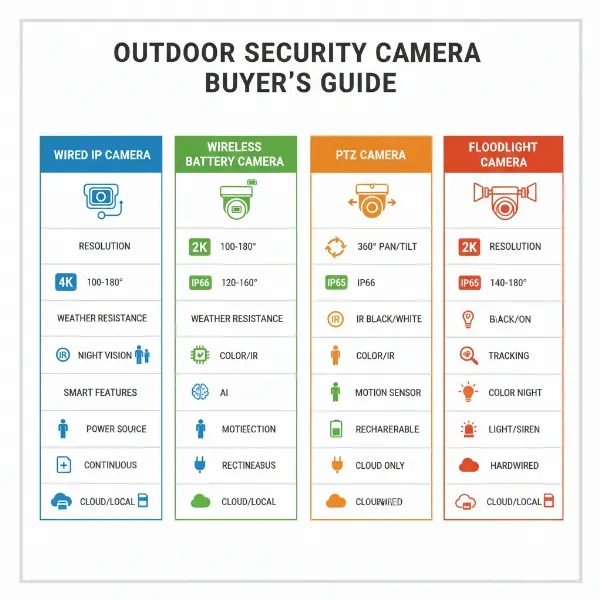 Detailed comparison of various outdoor camera types and their key features for informed buying decisions.
Key Criteria When Choosing an Outdoor Camera
Selecting the perfect outdoor camera requires a careful evaluation of several critical factors to match your specific security demands and budget.
Resolution
The clarity of your camera’s footage is paramount for identification purposes. While 1080p (Full HD) provides sufficient detail for most general surveillance, higher resolutions like 2K (1440p) or 4K (2160p Ultra HD) offer exceptional clarity, making it significantly easier to discern faces, license plates, or other crucial details, even when zoomed in digitally. Always prioritize the highest resolution you can afford for critical areas.
Field of View
The field of view (FOV) dictates how much area your camera can see. A wider angle lens covers a larger expanse, potentially reducing the number of cameras needed to monitor a specific zone. For example, a camera with a 140-degree FOV can significantly cover more ground than one with a 90-degree FOV. Consider panoramic or wide-angle options for comprehensive coverage of broad spaces like front yards or driveways, while narrower angles might be better for focused monitoring of a specific entrance.
Weather Resistance
Outdoor cameras must endure harsh environmental conditions. The Ingress Protection (IP) rating is a critical indicator of a camera’s resistance to dust and water. An IP65 rating signifies protection against dust and low-pressure water jets, suitable for moderate weather. For more extreme climates with heavy rain or snow, an IP66 or IP67 rating is advisable, offering protection against high-pressure water jets or even temporary submersion. Also, check the operating temperature range to ensure the camera can withstand local climate extremes.
Night Vision
Since many incidents occur under the cover of darkness, robust night vision capabilities are non-negotiable for outdoor cameras.
- Infrared (IR) Night Vision: Most common, IR LEDs enable cameras to capture clear black-and-white footage in low-light or total darkness. The effectiveness depends on the number and quality of IR LEDs, with ranges typically spanning 30 to 100 feet.
- Color Night Vision: Advanced cameras use low-light sensors, integrated spotlights, or floodlights to provide full-color images even at night, offering a more detailed and natural view.
Smart Features
Modern outdoor cameras are equipped with intelligent features that enhance their effectiveness and reduce false alarms:
- Motion Detection: Triggers recording and alerts only when movement is detected, conserving storage space.
- Person/Vehicle Detection: AI-powered features distinguish between human, animal, and vehicle movement, significantly reducing irrelevant notifications from swaying trees or passing cars.
- Activity Zones: Allows you to define specific areas within the camera’s view for monitoring, ignoring motion outside these zones.
- Facial Recognition: Some premium systems can identify familiar faces, providing more specific alerts or even automating smart home actions.
Storage
Where and how your video footage is stored is crucial for review and evidence.
- Local Storage: Utilizing SD cards or Network Video Recorders (NVRs), local storage offers privacy and often avoids subscription fees. However, capacity can be limited, and recordings might be vulnerable if the camera is stolen.
- Cloud Storage: Footage is securely uploaded to remote servers, providing off-site access from anywhere. This often requires a monthly subscription but offers greater capacity and protection against physical theft of the camera.
- Hybrid Storage: Combines local and cloud storage, offering the best of both worlds with redundancy and flexible access.
Power Supply
Consider the power options available for your desired installation spots:
- Wired: Offers consistent, reliable power but requires routing cables, which can be complex. Power over Ethernet (PoE) cameras use a single Ethernet cable for both power and data.
- Battery-Powered: Extremely flexible for placement as no wiring is needed, but requires periodic recharging or battery replacement. Battery life varies significantly between models, often lasting from a few months to two years.
- Solar-Powered: Eco-friendly and cost-effective for long-term use, relying on integrated or accessory solar panels to trickle-charge batteries. This requires adequate sunlight exposure.
Top Outdoor Cameras Available Today
The market offers a robust selection of high-performing outdoor cameras. Here are a few top contenders frequently praised for their features and reliability:
-
Nest Cam (battery): A versatile and user-friendly option, the Nest Cam (battery) is noted for its ease of installation and ability to detect people, vehicles, and animals. It provides 1080p resolution, a 130-degree field of view, and can store up to three hours of video locally if internet fails.
- Pros: Easy installation, intelligent detection, local storage backup, battery-powered flexibility.
- Cons: Subscription often required for full features, 1080p max resolution.
- Price Range: Mid-to-High.
-
Blink Outdoor 4: This truly wireless option is a budget-friendly choice known for its impressive battery life (up to two years on AA batteries). It offers 1080p video, improved night vision, and a wider field of view compared to previous models. It’s weatherproof and integrates well with its own base station.
- Pros: Excellent battery life, affordable, truly wireless, weatherproof.
- Cons: Subscription for person detection and cloud storage, requires a Sync Module.
- Price Range: Low-to-Mid.
-
EufyCam 3 (S330): Standing out with 4K resolution and integrated solar panels, the EufyCam 3 offers advanced AI features like facial recognition. It boasts local storage via a HomeBase, avoiding mandatory subscription fees for core features.
- Pros: 4K resolution, solar-powered for continuous charge, AI facial recognition, no monthly fees for basic features.
- Cons: Requires a HomeBase, solar charging needs adequate sunlight.
- Price Range: Mid-to-High.
-
Ring Stick Up Cam Solar: A popular choice for its seamless integration with the Alexa ecosystem, the Ring Stick Up Cam Solar offers flexible power through an included solar panel. It features 1080p resolution, two-way audio, and motion-activated alerts.
- Pros: Solar-powered, Alexa integration, two-way audio, easy setup.
- Cons: Ring Protect Plan needed for video history, 1080p max resolution.
- Price Range: Mid.
-
Arlo Pro 4 Spotlight Camera: Known for its wire-free setup and high-quality video, the Arlo Pro 4 delivers 2K HDR video with a 160-degree viewing angle. It features an integrated spotlight, color night vision, and two-way audio, making it a robust option for comprehensive outdoor monitoring.
- Pros: 2K HDR video, wide FOV, color night vision, integrated spotlight, wire-free.
- Cons: Premium price, Arlo Secure subscription recommended for full features.
- Price Range: High.
Outdoor Camera Installation Guide
Proper installation is paramount for the optimal performance and longevity of your outdoor camera system. Follow these steps for a secure and effective setup.
1. Choose Optimal Placement
Strategic placement ensures maximum coverage and deterrence. Mount cameras approximately 9 feet high to deter tampering while still capturing clear details of faces and activity. Focus on key entry points such as front doors, back doors, garage doors, and ground-level windows. Additionally, consider areas with high traffic, blind spots, or where valuables are stored outside. Ensure the camera has a clear line of sight, avoiding obstructions like tree branches or dense foliage.
2. Prepare Tools and Materials
Before starting, gather the necessary tools: a drill, screws, mounting brackets (usually included), a ladder, screwdrivers, and potentially cable ties or weatherproof junction boxes for wired installations. For wireless cameras, ensure your Wi-Fi signal is strong at the chosen location.
3. Connect Camera to Power and Network
- Wired Cameras: Carefully route power and data (Ethernet) cables, securing them neatly to prevent damage. Connect to the appropriate power source and your network router or NVR. Professional installation is often recommended for hardwired systems to ensure safety and proper functionality.
- Wireless Cameras (Battery/Solar): Simply mount the camera. For battery models, ensure batteries are fully charged. For solar panels, position them to receive adequate sunlight throughout the day. Connect the camera to your Wi-Fi network using the manufacturer’s mobile app.
4. Configure Camera Settings
Download the camera’s companion app on your smartphone or tablet. Follow the on-screen instructions to pair the camera, name it, and connect it to your home network. Within the app, configure essential features like motion detection sensitivity, define activity zones to minimize false alerts, and set up notification preferences. Test the live feed to confirm connectivity and image quality.
5. Test and Adjust Viewing Angle
Once configured, review the camera’s live feed from your app. Adjust the viewing angle to ensure optimal coverage of your target area. Check for any blind spots or areas that are not clearly visible. If your camera has PTZ capabilities, test these functions to ensure smooth operation. For night vision, check the feed after dark to confirm clear visibility.
Tips for Using and Maintaining Outdoor Cameras
To ensure your outdoor cameras provide reliable security for years to come, regular usage and maintenance are crucial.
Regular Cleaning
Periodically clean the camera lens and housing to remove dirt, dust, spiderwebs, and water spots that can obscure the view or trigger false alerts. Use a soft, damp cloth for the lens to avoid scratching. For cameras in particularly dusty or exposed environments, cleaning may be needed more frequently.
Check Connections and Power Regularly
For wired cameras, periodically inspect cables and connections for signs of wear, fraying, or weather damage. Ensure all connections remain secure. For battery-powered cameras, monitor battery levels via the app and recharge or replace batteries as needed. For solar-powered units, ensure the solar panel is clean and unobstructed to optimize charging efficiency.
Update Software and Firmware
Manufacturers regularly release software and firmware updates to improve performance, add new features, and patch security vulnerabilities. Enable automatic updates if available, or check for them manually through your camera’s app or manufacturer’s website. Keeping your camera’s software current is vital for security and optimal functionality.
Protect from Physical Damage and Tampering
Install cameras in locations that are difficult to reach without a ladder, ideally around 9 feet high. Consider using protective housings or tamper-resistant mounts if your camera is in a vulnerable spot. Some cameras offer tamper detection features that send alerts if the camera is moved or blocked. Ensure cables are concealed or protected within conduits to prevent intentional cutting.
Buying Guide: What to Know Before You Buy an Outdoor Camera
Before committing to a purchase, a thoughtful approach will ensure your outdoor camera system meets your expectations and provides long-term value.
Budget Expectations
Determine a realistic budget, understanding that camera prices vary widely based on features, resolution, and brand. Basic 1080p cameras can be quite affordable, while 4K models with advanced AI and robust weatherproofing will command a higher price. Remember to factor in potential recurring costs for cloud storage subscriptions or professional monitoring, which can significantly add to the total ownership cost.
Specific Security Needs
Identify what you primarily need the camera for. Are you looking to deter crime, monitor deliveries, keep an eye on pets, or watch a specific vulnerable area? Your specific needs will dictate the essential features you should prioritize. For example, monitoring a large property might require PTZ cameras or multiple fixed cameras with wide fields of view.
Essential Features
Based on your needs, make a list of non-negotiable features. High resolution and excellent night vision are generally universal requirements for effective outdoor surveillance. Weather resistance (look for IP66/IP67 ratings), reliable motion detection, and a suitable power option (wired, battery, solar) are also critical considerations. Two-way audio and integrated lighting can be valuable deterrents and communication tools.
Reputable Brands and Ecosystem Compatibility
Stick with well-established brands like Nest, Ring, Arlo, Eufy, or Blink, which typically offer reliable products, good customer support, and consistent software updates. Consider if the camera integrates with your existing smart home ecosystem (e.g., Alexa, Google Home) for seamless control and automation. Compatibility ensures all your smart devices work together efficiently.
Warranty and Customer Support
Check the manufacturer’s warranty period and their reputation for customer service. A good warranty provides peace of mind, while accessible customer support is invaluable if you encounter technical issues or need assistance with setup. Online reviews often provide insights into a brand’s reliability and support quality.
Subscription Models
Many smart outdoor cameras offer enhanced features, extended cloud storage, and advanced AI detection through monthly or annual subscription plans. Understand what features are free versus what requires a subscription. Sometimes, a “free” camera might become costly over time due to required subscriptions for video history or advanced alerts. Local storage options can help avoid these recurring fees.
Conclusion
Choosing the right outdoor camera is a critical step in fortifying your property’s security. By understanding the various types available, carefully evaluating key features like resolution, weather resistance, night vision, and smart capabilities, and considering your budget and installation needs, you can make an informed decision. Whether you prioritize ease of installation with a battery-powered unit, robust performance from a wired system, or advanced AI features, there’s an outdoor camera perfectly suited for your requirements. Investing in the right outdoor camera not only protects your assets but also provides invaluable peace of mind. What specific area of your property do you believe would benefit most from enhanced surveillance?
Câu Hỏi Thường Gặp
How high should an outdoor camera be installed?
Outdoor cameras are generally recommended to be installed at approximately 9 feet high. This height makes it difficult for potential intruders to tamper with the camera while still being low enough to capture clear and detailed images of faces and activities around your property.
Do outdoor cameras need Wi-Fi?
Many outdoor cameras rely on Wi-Fi for connectivity, allowing for easy installation and remote access to footage. However, not all outdoor cameras require Wi-Fi. Wired IP cameras use Ethernet cables, and cellular cameras operate on mobile data networks, making them suitable for locations without Wi-Fi access.
What is an IP rating?
An IP (Ingress Protection) rating indicates a camera’s resistance to dust and water. The first digit represents dust protection (0-6), and the second digit represents water protection (0-9). For outdoor use, an IP65 rating is the minimum recommended, while IP66 or IP67 ratings offer superior protection against harsh weather conditions.
Can outdoor cameras record 24/7?
Yes, many outdoor cameras, particularly wired IP cameras with NVRs (Network Video Recorders), are capable of 24/7 continuous recording. Battery-powered cameras typically only record when motion is detected to conserve power, though some high-end models offer options for continuous recording when connected to a constant power source.
How long do battery-powered outdoor cameras last?
The battery life of outdoor cameras varies significantly based on usage, battery capacity, and features like motion detection frequency. Some cameras boast up to two years on a single charge with typical usage, while others may require recharging every few months. Integrating solar panels can extend battery life indefinitely in areas with adequate sunlight.