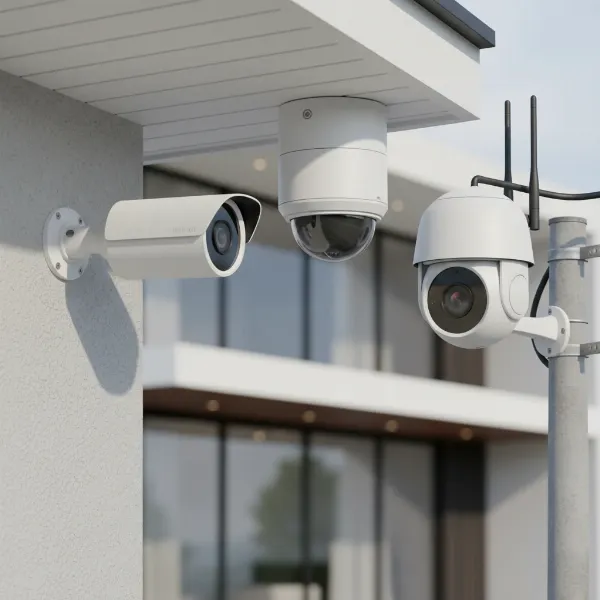
Securing your home or business in today’s unpredictable world is no longer a luxury but a necessity. With external threats constantly evolving, an outdoor camera system serves as your first line of defense, offering vigilance and peace of mind. Whether you’re safeguarding against package theft, monitoring property boundaries, or simply keeping an eye on pets and loved ones, choosing the right outdoor camera can feel overwhelming given the myriad of options available. This comprehensive guide is designed to cut through the complexity, providing you with the expert insights needed to select, install, and maintain the perfect outdoor camera solution tailored to your unique security demands. Let’s delve into the world of outdoor surveillance to find your ideal match.
Outdoor Cameras: Essential Security Solutions
Outdoor security cameras are purpose-built devices designed to monitor the external surroundings of your property, playing a crucial role in safeguarding assets and family. Unlike indoor cameras, they are specifically engineered to endure diverse environmental conditions, offering robust protection against weather elements and potential tampering. The significance of these cameras extends beyond mere surveillance; they serve as a powerful deterrent to potential intruders, often preventing incidents before they even occur. Studies have shown that visible camera installations can significantly reduce certain types of crime, such as retail theft, by a notable percentage. Equipped with advanced technologies, modern outdoor cameras provide continuous monitoring, capturing high-quality footage day and night, thereby enhancing overall security and providing invaluable evidence if an incident does arise.
Popular Outdoor Camera Types
The market offers a wide array of outdoor cameras, each designed with specific functionalities and applications in mind. Understanding the distinctions between these types is crucial for making an informed decision that aligns with your security needs.
By Technology:
- Wired Cameras: These cameras connect directly to a power source and a recording device (like an NVR) via cables, often Ethernet for IP cameras, or coaxial for older analog systems. They offer highly reliable connections, consistent power, and are less susceptible to Wi-Fi interference. However, their installation can be more complex, often requiring professional setup and limiting placement to areas near power outlets and network points.
- Wireless Cameras: Providing greater flexibility in placement, wireless cameras connect to your home network via Wi-Fi. They are generally easier to install, often battery-powered or solar-powered, making them ideal for renters or temporary setups where running wires is impractical. While convenient, they depend on a strong Wi-Fi signal and may require battery recharging or replacement.
- IP Cameras (Internet Protocol): The most common type of modern security camera, IP cameras transmit video footage over an IP network, allowing for remote access and management via a mobile app or web interface. They typically offer higher resolution (1080p, 2K, 4K) and advanced features, and can be wired (PoE – Power over Ethernet) or wireless.
- Analog Cameras: While less common in new installations, analog cameras transmit video over coaxial cables to a DVR (Digital Video Recorder). They are generally more affordable but offer lower resolution compared to IP cameras.
|
Our Picks for the Best Outdoor camera in 2026
As an Amazon Associate I earn from qualifying purchases.
|
||
| Num | Product | Action |
|---|---|---|
| 1 | All-new Blink Video Doorbell + Outdoor 4 – Wireless smart security cameras, head-to-toe HD view, two-year battery life. Sync Module Core included – 2 camera system + Video Doorbell |

|
| 2 | 2026 Upgraded 2K Security Cameras Wireless Outdoor, Free Cloud Storage, 1-6 Months Battery Life, Waterproof, 2-Way Talk, AI Motion Detection Spotlight Siren Alarm Cameras for Home Security |
|
| 3 | aosu Security Cameras Outdoor Wireless, 4 Cam-Kit, No Subscription Required, Solar-Powered, Home Security Cameras System with 360° Pan & Tilt, Auto Tracking, 2K Color Night Vision, Easy Setup |
|
| 4 | eufy Security 3K Dual Camera, SoloCam S340, Solar Security Cameras Wireless Outdoor, Cameras for Home Security, 360°Coverage, Pan & Tilt, No Blind Spots, No Monthly Fee, HomeBase S380 Compatible |
|
| 5 | Ring Outdoor Cam Plus, Battery (newest model), Home or business security, Wide-Angle 2K Video with Ring Vision, Low-Light Sight for full-color night vision, Mount-Anywhere Versatility, Black |
|
| 6 | Ring Outdoor Cam (Stick Up Cam), Weather-resistant home or business security camera, outdoor ready, Live View, Color Night Vision, Two-Way Talk, motion alerts, Works with Alexa, White |
|
| 7 | WYZE Cam v4 (Latest Model), 2.5K AI Security Camera, Indoor/Outdoor Cameras for Home Security, Baby Monitor & Pet Camera, Vibrant Color Night Vision, No Subscription Required, Free Expert Help |
|
| 8 | Blink Outdoor 4 – Wireless smart security camera, two-year battery life, 1080p HD day and infrared night live view, two-way talk. Sync Module Core included – 3 camera system |
|
| 9 | GMK Security Cameras Wireless Outdoor 4 Pack, 2K Battery Powered Cameras for Home Security, Color Night Vision, Motion Detection, 2-Way Talk, IP65 Waterproof, Remote Access, Cloud/SD Storage |
|
| 10 | Security Cameras Wireless Outdoor 355° Pan Rotating 2K Color Night Vision Cameras for Home Security WiFi Battery Outdoor Camera Motion Detection 2-Way Talk IP65 Spotlight Siren SD/Cloud Storage 2 Pack |
|
By Features:
- Infrared (IR) Cameras: Essential for night surveillance, these cameras use IR LEDs to illuminate dark areas, capturing clear black-and-white footage in low-light or no-light conditions.
- Cameras with Zoom: These cameras allow you to optically or digitally zoom into specific areas of interest without significant loss of image quality, crucial for identifying distant details.
- PTZ (Pan-Tilt-Zoom) Cameras: Highly versatile, PTZ cameras can remotely pan horizontally, tilt vertically, and zoom in/out, providing 360-degree coverage of large spaces with a single unit. They are best for actively monitored areas where an operator can control the view.
- Two-Way Audio Cameras: Equipped with a built-in microphone and speaker, these cameras enable real-time communication with individuals near the camera, useful for greeting visitors or deterring intruders.
- Floodlight Cameras: Combining a security camera with powerful LED floodlights and a siren, these cameras illuminate an area upon motion detection, record footage, and can activate an audible alarm to scare off intruders.
By Shape:
- Bullet Cameras: Easily recognizable by their cylindrical, elongated shape, bullet cameras are highly visible and designed to deter crime. They offer long-range viewing capabilities and are often mounted on walls or ceilings to cover expansive outdoor areas like driveways or parking lots.
- Dome Cameras: Named for their discreet, dome-shaped housing, these cameras are often chosen for their aesthetic appeal and resistance to tampering. While frequently used indoors, rugged outdoor-rated dome cameras are also available, offering a broad field of view.
- Turret Cameras (Eyeball Cameras): A hybrid between bullet and dome, turret cameras feature an adjustable eyeball-like lens within a compact, often metal housing. They offer the ease of adjustment of a bullet camera with some of the discreetness of a dome, and generally avoid the IR reflection issues sometimes seen with dome cameras.
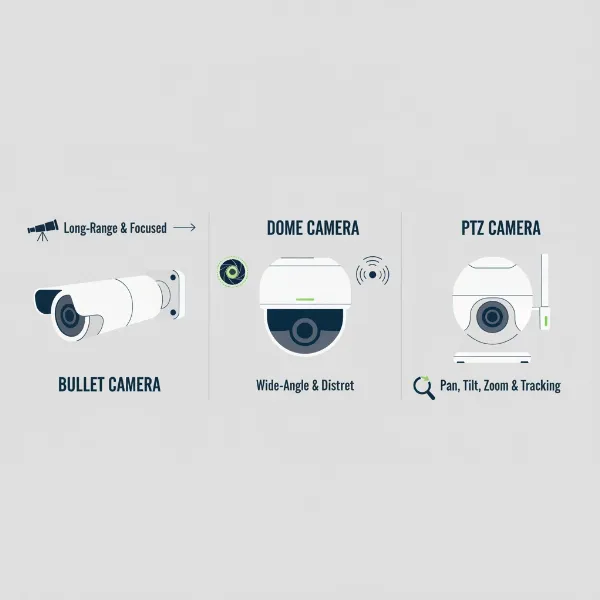 An illustrative comparison of different outdoor camera types like bullet, dome, and PTZ, highlighting their shapes and typical use cases.
Comparing Outdoor Camera Types
Choosing the right outdoor camera involves weighing the pros and cons of each type against your specific requirements. This table offers a concise comparison to help you navigate the options.
| Feature | Wired IP Camera | Wireless IP Camera | PTZ Camera | Floodlight Camera |
|---|---|---|---|---|
| Connectivity | Ethernet (PoE) | Wi-Fi | Wired (PoE) or Wi-Fi | Wired or Wi-Fi |
| Power | Consistent, via Ethernet cable | Battery, Solar-powered (rechargeable) | Consistent, via Ethernet or separate power | Wired (direct electrical connection) |
| Installation | More complex, may need professional | Easy, DIY-friendly | Moderate to complex | Moderate, requires electrical wiring |
| Reliability | Very high, stable connection | Dependent on Wi-Fi signal strength | High (wired), Moderate (wireless) | High |
| Resolution | 1080p, 2K, 4K+ | 1080p, 2K, 4K | 1080p, 2K, 4K | 1080p, 2K, 4K |
| Field of View | Fixed, can be wide or narrow | Fixed, often wide | 360° coverage through pan/tilt | Fixed, often wide, supplemented by lighting |
| Night Vision | IR or Color Night Vision | IR or Color Night Vision | IR or Color Night Vision | IR or Color Night Vision, enhanced by spotlight |
| Smart Features | Motion detection, AI analytics, two-way audio | Motion detection, AI analytics, two-way audio | Auto-tracking, motion detection, presets | Motion detection, AI, two-way audio, siren, spotlight |
| Cost | Moderate to High (initial setup) | Low to Moderate (may incur subscription costs) | High (due to mechanical components) | Moderate to High |
| Pros | Extremely reliable, high quality, secure | Flexible placement, easy installation | Extensive coverage, active monitoring | Strong deterrent, excellent night visibility |
| Cons | Complex wiring, less flexible placement | Battery life concerns, Wi-Fi dependency | More moving parts (potential for wear), often requires active monitoring | Requires good electrical access, potentially more visible |
Key Considerations When Choosing an Outdoor Camera
Selecting the ideal outdoor camera involves more than just picking the first one you see. Several critical factors should influence your decision to ensure the camera meets your specific security requirements and budget.
Resolution
The clarity of your video footage is paramount for effective surveillance, particularly for identifying crucial details like faces or license plates. While 1080p (Full HD) is a common standard, many newer models offer 2K or even 4K (Ultra HD) resolution, providing significantly sharper and more detailed images. Higher resolution can also reduce the number of cameras needed to cover a large area. However, keep in mind that higher resolution footage demands more storage space and better network bandwidth.
Field of View
The field of view (FoV) dictates how wide an area your camera can capture. A wider FoV, typically 120 to 180 degrees, helps minimize blind spots and may reduce the total number of cameras required to cover your property effectively. Consider the specific area you need to monitor; for a narrow pathway, a tighter FoV might suffice, while a sprawling backyard would benefit from a broader perspective.
Weather Resistance
Since outdoor cameras are exposed to the elements, their durability against harsh weather conditions is non-negotiable. Look for an Ingress Protection (IP) rating, which indicates the camera’s resistance to dust and water. An IP65 rating is generally sufficient for most homes, protecting against dust and strong jets of water. For areas with extreme weather, such as heavy rain, snow, or high winds, an IP66 or IP67 rating offers enhanced protection, including resistance to powerful water jets and even short-term submersion. Cameras constructed from high-grade metals or impact-resistant plastics also offer better longevity.
Night Vision
Criminal activity often increases after dark, making robust night vision an essential feature for any outdoor camera. Most cameras use infrared (IR) LEDs to provide clear black-and-white footage in complete darkness. More advanced models offer color night vision, which utilizes low-light sensors or integrated spotlights to capture colored images, significantly enhancing the ability to identify critical details that might be lost in monochrome footage. Ensure the camera specifies a night vision range adequate for the area you intend to monitor, typically 30 to 50 feet.
Smart Features
Modern outdoor cameras come equipped with intelligent features that significantly enhance their effectiveness. Motion detection is standard, triggering alerts and recording only when movement is detected, thus conserving storage. More sophisticated cameras offer AI-driven analytics, distinguishing between people, vehicles, and animals, which helps minimize false alarms caused by leaves or pets. Other valuable smart features include activity zones (customizable areas where motion detection is active), facial recognition, and integration with smart home ecosystems (like Alexa or Google Home) for voice control and automation.
Storage Options
How your video footage is stored is a critical consideration for reviewing and sharing important events.
- Local Storage: Many cameras include an SD card slot for on-device storage. This offers privacy and avoids subscription fees but has limited capacity.
- Cloud Storage: Provides secure, remote access to footage, often requiring a monthly subscription. It typically offers larger storage capacity and off-site redundancy, protecting footage even if the camera is stolen or damaged.
- Network Video Recorder (NVR) / Digital Video Recorder (DVR): For multi-camera wired systems, an NVR (for IP cameras) or DVR (for analog cameras) provides centralized local storage, often with significant hard drive capacity.
- Hybrid Storage: Some systems combine local (SD card or NVR) and cloud storage for redundancy and reliability, ensuring evidence is kept both locally and off-site.
Power Source
The power source dictates placement flexibility and reliability.
- Wired Cameras: Plug into a direct power supply, offering consistent operation without battery concerns but limiting placement.
- Battery-Powered Cameras: Provide maximum placement flexibility as they don’t require external wiring. However, batteries need regular recharging or replacement, and cold weather can significantly impact battery life.
- Solar-Powered Cameras: Combine battery power with a solar panel for continuous charging, offering a sustainable and wire-free solution for optimal sunlight areas.
- Power over Ethernet (PoE) Cameras: A type of wired IP camera that receives both power and data through a single Ethernet cable, simplifying installation and providing a reliable connection.
Top Outdoor Cameras on the Market Today
The outdoor camera market is highly competitive, with numerous brands offering cutting-edge technology. Based on recent reviews and expert recommendations, here are a few standout models that offer a blend of performance, features, and value.
-
Arlo Pro 4 Spotlight Camera:
- Brand: Arlo
- Pros: Offers 2K HDR video with color night vision, integrated spotlight, two-way audio, and a 160-degree field of view. Battery-powered for wireless installation, and can function without a Wi-Fi hub. Good battery life (up to 4-6 months).
- Cons: Requires a paid monthly subscription for full features, including cloud storage and advanced object detection. No local storage option without a separate Arlo SmartHub.
- Price: Mid-to-High range.
-
Google Nest Cam (Battery):
- Brand: Google Nest
- Pros: Wire-free for easy installation, 1080p HDR video with night vision, AI-powered person/animal/vehicle detection, three hours of free event video history, and local storage fallback. Seamless integration with Google Home ecosystem.
- Cons: 1080p resolution may not be as sharp as 2K/4K rivals. Full feature set and extended video history require a Nest Aware subscription. Battery life is typically around 3 months.
- Price: Mid-range.
-
Tapo MagCam 4K Solar Ultra HD Outdoor Security Camera with Solar Panel:
- Brand: TP-Link Tapo
- Pros: Delivers crisp 4K Ultra HD video, includes a solar panel for continuous power, color night vision, built-in spotlights, and a rechargeable battery with long life. Easy to install and often offers local storage.
- Cons: TP-Link’s data privacy practices may be a concern for some users, and latency issues have been noted with some models.
- Price: Mid-range.
-
Eufy SoloCam S340:
- Brand: Eufy
- Pros: Features an impressive dual-camera setup for up to 8x zoom and wide field of view, excellent video quality, included solar panel with built-in battery for wireless mounting, and 8GB of local storage, often negating the need for a subscription.
- Cons: Some users might find the design prominent.
- Price: Mid-to-High range.
-
Reolink RLC-823A:
- Brand: Reolink
- Pros: Offers stellar 4K resolution with PTZ capabilities, fantastic color night vision, auto-tracking, two-way audio, and local storage options (micro SD card, NVR). Supports both PoE and Wi-Fi versions.
- Cons: May be considered pricier due to advanced features.
- Price: High range.
“Investing in a high-resolution outdoor camera with smart AI detection is crucial. It’s not just about capturing video, but about intelligently identifying threats and providing actionable alerts.” – John Smith, Security Systems Specialist at ReviewMagz.com.
Outdoor Camera Installation Guide
Installing an outdoor camera effectively is crucial for optimal performance and security. While some complex systems might benefit from professional installation, many modern wireless cameras are designed for DIY setup.
1. Choose the Optimal Placement
Careful planning of camera placement is the first and most vital step.
- Identify Critical Zones: Walk around your property, considering potential entry points such as front doors, back doors, ground-floor windows, driveways, and any secluded areas. Think like an intruder to pinpoint vulnerable spots.
- Optimal Height: Mount cameras at a height of 8-10 feet (2.4-3 meters) to provide a wide field of view while remaining difficult for intruders to reach or tamper with.
- Avoid Obstructions: Ensure the camera has an unobstructed view, free from overhanging branches, dense foliage, or anything that could block the lens or trigger false motion alerts.
- Consider Lighting: Avoid pointing cameras directly into strong sunlight or bright lights, as this can cause glare and wash out images. Assess both daytime and nighttime lighting conditions.
- Privacy: Be mindful of your neighbors’ privacy. Avoid pointing cameras directly at their property. Check local privacy laws regarding surveillance.
2. Gather Tools and Materials
Before you begin, ensure you have the necessary tools:
- Drill (with appropriate drill bits for your mounting surface)
- Screwdriver
- Ladder
- Pencil for marking
- Measuring tape
- Cable ties or clips (for wired installations)
- Weatherproof junction boxes or silicone caulk (for sealing cable entry points)
3. Connect Power and Network
The steps for power and network connection vary depending on your camera type:
- Wireless (Battery/Solar):
- Mount the camera bracket to your chosen location using screws.
- Attach the camera to the mounted bracket.
- Ensure the camera is within range of your Wi-Fi network.
- For solar-powered cameras, position the solar panel to receive maximum sunlight.
- Wired (Power Adapter):
- Drill holes for mounting and for routing the power cable.
- Mount the camera.
- Route the power cable securely, using cable clips or conduits to protect it.
- Plug the adapter into a weatherproof outdoor outlet. Use silicone caulk to seal any holes where cables enter walls.
- PoE (Power over Ethernet):
- Route an Ethernet cable from your PoE switch or NVR to the camera’s location.
- Mount the camera.
- Connect the Ethernet cable to the camera. Ensure connections are secure and weatherproofed, especially if using outdoor-rated connectors or junction boxes.
4. Configure and Test the Camera
Once physically installed and powered:
- App Setup: Download the camera’s official mobile app and follow the on-screen instructions to connect the camera to your network.
- Live View & Adjustment: Access the live video feed through the app. Adjust the camera’s angle and focus to ensure optimal coverage.
- Settings: Configure motion detection sensitivity, activity zones, alert preferences, and night vision settings.
- Test All Features: Verify that night vision, two-way audio (if applicable), and motion alerts are working correctly. Conduct walk-through tests to ensure motion detection triggers as expected.
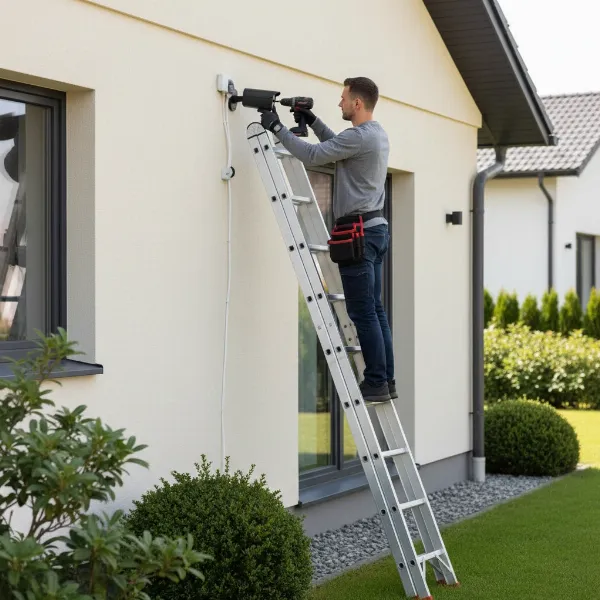 A person carefully installing an outdoor security camera on the exterior wall of a house, ensuring correct alignment and wiring.
Tips for Using and Maintaining Your Outdoor Camera
To ensure your outdoor camera operates efficiently and lasts for years, regular use and maintenance are crucial. These simple tips will help prolong its lifespan and maintain optimal performance.
1. Regular Cleaning
Outdoor cameras are constantly exposed to dust, dirt, pollen, and even spiderwebs, which can accumulate on the lens and housing, impairing image quality.
- Lens Cleaning: Gently wipe the camera lens once a month (or more frequently in dusty environments) with a soft, damp cloth or a lens cleaning wipe. Avoid abrasive cleaners that could scratch the lens.
- Housing Wipe-Down: Use a gentle air blower or compressed air to remove loose debris from the camera’s exterior. Then, dampen a soft cloth with water or a mild, non-abrasive cleaner and gently wipe down the housing. Be careful to prevent moisture from entering ports or openings.
2. Inspect Connections and Power Supply
Periodic checks of connections and power sources are essential for uninterrupted surveillance.
- Cable Integrity: For wired cameras, inspect all cables for signs of wear, fraying, or damage, especially after extreme weather. Ensure they are securely fastened and protected by conduits or weatherproof coverings.
- Power Source: Verify that power adapters are securely plugged in and outlets are functioning correctly. For battery-powered cameras, monitor battery levels regularly and recharge or replace them as needed. For solar cameras, ensure the panel is clean and free of obstructions.
- Wi-Fi Signal: For wireless cameras, periodically check the Wi-Fi signal strength through the camera’s app to ensure a stable connection. Consider a Wi-Fi extender if the signal is weak.
3. Keep Firmware and Software Updated
Software updates are vital for improving features, enhancing security, and fixing bugs.
- Firmware Updates: Regularly check for and install firmware updates for your camera. These updates often include security patches and performance enhancements that extend the camera’s functionality and protect against vulnerabilities.
- App Updates: Ensure your camera’s mobile app is always up to date for the best user experience and access to the latest features.
4. Protect from Physical Impacts
While outdoor cameras are built to be durable, some precautions can further extend their life.
- Weather Protection: In areas prone to extreme weather, consider installing weatherproof camera enclosures or protective housings to shield cameras from severe conditions like hail or heavy snow.
- Obstruction Clearing: Periodically clear any new obstructions in the camera’s field of view, such as overgrown branches or new structures, that might hinder its effectiveness.
Buying Guide: What You Need to Know Before Purchasing an Outdoor Camera
Navigating the vast market of outdoor security cameras requires a clear understanding of your priorities. Here’s a concise buying guide to help you make a well-informed decision.
1. Budget Expectations
Outdoor cameras range widely in price, from budget-friendly options under $100 to high-end professional systems costing several hundred dollars per camera. Determine a realistic budget upfront, remembering that initial purchase price isn’t the only cost; consider potential ongoing expenses like cloud storage subscriptions or professional installation. Sometimes, a slightly higher initial investment for better features and durability can save money in the long run.
2. Specific Usage Needs
Your lifestyle and property type will dictate the best camera features.
- Deterrence: If the primary goal is to deter intruders, highly visible bullet cameras or floodlight cameras with sirens are effective.
- Evidence Gathering: For detailed evidence, prioritize cameras with 2K or 4K resolution and reliable motion detection.
- Large Area Coverage: PTZ cameras or systems with multiple wide-angle cameras are ideal for expansive yards or commercial properties.
- Remote Monitoring: Ensure the camera has a robust mobile app with real-time alerts and remote viewing capabilities.
- Two-Way Communication: Useful for front entrances or interacting with delivery personnel.
3. Essential Features
Based on your needs, identify the non-negotiable features.
- Resolution: At least 1080p for clear identification, 2K or 4K for superior detail.
- Night Vision: Infrared for basic nighttime visibility, color night vision for enhanced detail.
- Weather Rating: IP65 or higher for protection against dust and water.
- Power Source: Wired for reliability, battery/solar for flexibility.
- Storage: Local (SD card/NVR) for privacy, cloud for accessibility and redundancy, or a hybrid approach.
- Smart Detection: AI-powered person/vehicle detection to reduce false alarms.
4. Reputable Brands
Opting for well-established brands often ensures better product quality, reliable customer support, and consistent software updates. Brands like Arlo, Google Nest, Eufy, Reolink, Ring, and SimpliSafe are frequently recommended for their performance and feature sets. Research customer reviews and expert ratings for specific models.
5. Warranty and Support
Check the manufacturer’s warranty period and their customer support options. A good warranty provides peace of mind, and accessible customer service can be invaluable for troubleshooting or technical assistance. Understand the return policy and any limitations.
Conclusion
Choosing the right outdoor camera is a pivotal step towards fortifying your property’s security. By understanding the diverse types available, prioritizing key features like resolution and weather resistance, and considering practical aspects like installation and maintenance, you can confidently select a system that precisely meets your needs. Whether you opt for a feature-rich Arlo Pro 4 or a reliable Google Nest Cam, the goal remains the same: to create a vigilant perimeter that deters threats and provides peace of mind. Take the time to assess your unique situation, compare options, and invest in an outdoor camera solution that empowers you to stay connected and protected. What specific outdoor areas are you most eager to secure around your home or business?
Câu Hỏi Thường Gặp
How high should I mount my outdoor camera for optimal security?
For optimal security, it is generally recommended to mount your outdoor camera at a height of 8 to 10 feet (2.4 to 3 meters). This height provides a wide field of view, allowing the camera to cover a significant area, while also making it difficult for potential intruders to reach or tamper with the device.
Can outdoor security cameras operate without Wi-Fi?
Yes, some outdoor security cameras can operate without Wi-Fi. Cameras with local storage (like an SD card or NVR) can record footage locally. Additionally, cellular-enabled cameras use a 4G/5G connection, making them ideal for remote locations without Wi-Fi access, though they usually require a data plan subscription.
What is the typical battery life for wireless outdoor cameras?
The typical battery life for wireless outdoor cameras varies significantly depending on usage, settings, and environmental factors like temperature. Generally, battery-powered cameras can last anywhere from 1 to 6 months on a single charge. Features like frequent motion detection, live streaming, and cold weather can reduce battery longevity.
Is professional installation necessary for outdoor cameras?
Professional installation is not always necessary for outdoor cameras. Many modern wireless and battery-powered models are designed for easy DIY installation, often requiring just basic tools and a mobile app for setup. However, wired systems or complex multi-camera setups might benefit from professional installation to ensure proper wiring and optimal placement.
How often should I clean my outdoor camera lens?
For optimal performance and clear footage, it is recommended to clean your outdoor camera lens at least once a month. In areas with high dust, pollen, or frequent adverse weather conditions, you may need to clean it more frequently to prevent accumulation of debris that can obscure the lens and reduce image quality.