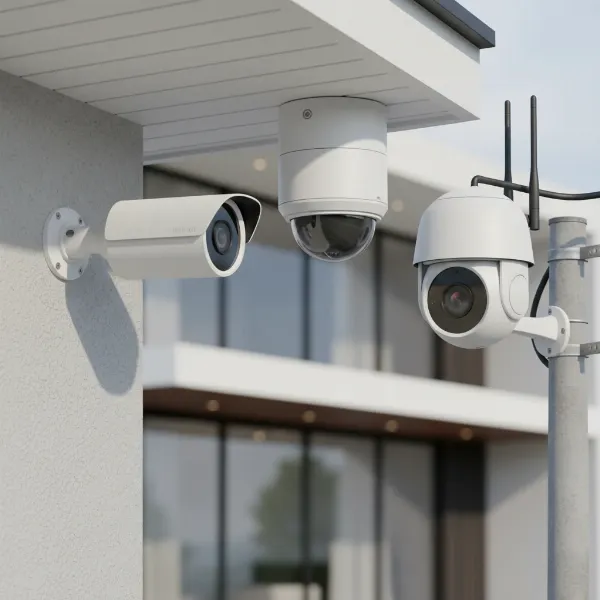
Securing your home or business in today’s dynamic world is paramount, and the choice of surveillance system plays a pivotal role. While traditional “manual systems”—relying solely on physical deterrents, human patrols, or simple, non-integrated monitoring—once offered a baseline of protection, modern outdoor cameras have revolutionized how we safeguard our properties. These advanced devices provide a proactive, intelligent, and round-the-clock defense, offering peace of mind through constant vigilance and immediate alerts. Let’s delve into the world of outdoor cameras to discover why they are not just an option, but a truly indispensable element of contemporary security, far surpassing the limitations of older, less capable methods.
Outdoor Camera: Essential Security Solutions
Outdoor cameras stand as the frontline defense for any property, playing a crucial role in deterring potential threats before they escalate. They are specifically engineered to monitor external environments, providing comprehensive coverage of entry points, perimeters, and vulnerable areas. The mere presence of a visible outdoor camera can significantly reduce the likelihood of criminal activity, acting as a powerful psychological deterrent.
Beyond deterrence, these cameras serve as invaluable tools for gathering crucial evidence, capturing high-definition footage that can identify intruders, track movements, and document incidents for law enforcement. In a world where security concerns are ever-present, integrating robust outdoor surveillance isn’t just an upgrade; it’s a fundamental investment in protecting assets, ensuring family safety, and maintaining overall peace of mind.
Popular Types of Outdoor Cameras
The market offers a diverse range of outdoor cameras, each designed with specific functionalities to meet varying security needs. Understanding these types helps in selecting the most effective solution for your unique requirements. These cameras can be broadly categorized by their technology, features, and physical form factor.
By Technology
- Wired Cameras (Analog & IP): Wired cameras, including traditional analog and modern IP (Internet Protocol) cameras, provide a reliable, consistent connection. Analog cameras transmit video over coaxial cables to a DVR (Digital Video Recorder), while IP cameras use Ethernet cables for higher resolution digital video to an NVR (Network Video Recorder) or cloud. They offer robust performance, free from Wi-Fi interference, but require more complex installation for cabling.
- Wireless Cameras (Wi-Fi & Cellular): These cameras connect to your home Wi-Fi network or use cellular data (LTE) for areas without Wi-Fi access. They are easier to install due to the absence of video cables and offer flexible placement options. Many wireless models are battery-powered, some even featuring integrated solar panels for continuous charging, making them ideal for remote monitoring.
|
Our Picks for the Best Outdoor camera in 2026
As an Amazon Associate I earn from qualifying purchases.
|
||
| Num | Product | Action |
|---|---|---|
| 1 | Security Cameras Wireless Outdoor 355° Pan Rotating 2K Color Night Vision Cameras for Home Security WiFi Battery Outdoor Camera Motion Detection 2-Way Talk IP65 Spotlight Siren SD/Cloud Storage 2 Pack |

|
| 2 | All-new Blink Video Doorbell + Outdoor 4 – Wireless smart security cameras, head-to-toe HD view, two-year battery life. Sync Module Core included – 2 camera system + Video Doorbell |
|
| 3 | Ring Outdoor Cam Plus, Battery (newest model), Home or business security, Wide-Angle 2K Video with Ring Vision, Low-Light Sight for full-color night vision, Mount-Anywhere Versatility, Black |
|
| 4 | GMK Security Cameras Wireless Outdoor 4 Pack, 2K Battery Powered Cameras for Home Security, Color Night Vision, Motion Detection, 2-Way Talk, IP65 Waterproof, Remote Access, Cloud/SD Storage |
|
| 5 | eufy Security 3K Dual Camera, SoloCam S340, Solar Security Cameras Wireless Outdoor, Cameras for Home Security, 360°Coverage, Pan & Tilt, No Blind Spots, No Monthly Fee, HomeBase S380 Compatible |
|
| 6 | Blink Outdoor 4 – Wireless smart security camera, two-year battery life, 1080p HD day and infrared night live view, two-way talk. Sync Module Core included – 3 camera system |
|
| 7 | Ring Outdoor Cam (Stick Up Cam), Weather-resistant home or business security camera, outdoor ready, Live View, Color Night Vision, Two-Way Talk, motion alerts, Works with Alexa, White |
|
| 8 | 2026 Upgraded 2K Security Cameras Wireless Outdoor, Free Cloud Storage, 1-6 Months Battery Life, Waterproof, 2-Way Talk, AI Motion Detection Spotlight Siren Alarm Cameras for Home Security |
|
| 9 | WYZE Cam v4 (Latest Model), 2.5K AI Security Camera, Indoor/Outdoor Cameras for Home Security, Baby Monitor & Pet Camera, Vibrant Color Night Vision, No Subscription Required, Free Expert Help |
|
| 10 | aosu Security Cameras Outdoor Wireless, 4 Cam-Kit, No Subscription Required, Solar-Powered, Home Security Cameras System with 360° Pan & Tilt, Auto Tracking, 2K Color Night Vision, Easy Setup |
|
By Features
- Infrared (IR) Night Vision Cameras: Equipped with IR LEDs, these cameras illuminate dark scenes with invisible infrared light, capturing clear black-and-white video in complete darkness.
- Color Night Vision Cameras: Utilizing advanced sensors, wider apertures, or integrated spotlights, these cameras can capture full-color video even in low-light conditions, providing more detail than traditional IR.
- Zoom Cameras: Allow users to optically or digitally magnify specific areas of the footage without significant loss of quality, crucial for identifying distant details like license plates or faces.
- PTZ (Pan-Tilt-Zoom) Cameras: These versatile cameras can remotely pan horizontally, tilt vertically, and zoom in/out, offering dynamic control over a wide surveillance area from a single point.
- Cameras with Two-Way Audio: Featuring a built-in microphone and speaker, these allow for real-time communication with individuals near the camera, enabling verbal warnings or conversations.
- Smart Feature Cameras: Modern cameras incorporate AI-driven analytics, enabling them to differentiate between people, vehicles, and animals, significantly reducing false alarms and focusing alerts on genuine threats. Many also offer motion-activated spotlights or sirens as active deterrents.
By Form Factor
- Bullet Cameras: Easily recognizable by their cylindrical, “bullet-like” shape, these cameras are highly visible and often serve as a strong deterrent. They are typically fixed-lens and excel at monitoring specific, long-range areas. Their robust, weather-resistant housing makes them popular for outdoor use.
- Dome Cameras: Designed with a discreet, dome-shaped casing, these cameras are less conspicuous and more resistant to vandalism. They offer a wider field of view and are often used in areas where a subtle appearance is preferred, though some models are also built for outdoor resilience.
- Turret Cameras (Eyeball Cameras): A hybrid between bullet and dome cameras, turret cameras have a compact, eyeball-like design that offers flexibility in aiming the lens while maintaining a relatively low profile. They typically offer good night vision and are easier to adjust during installation than traditional dome cameras.
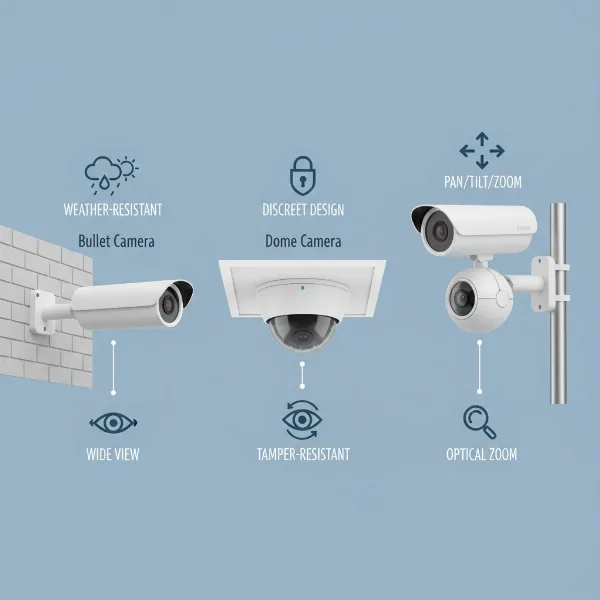 Different types of outdoor security cameras including bullet, dome, and PTZ models, highlighting their diverse forms and applications.
Comparison Table of Outdoor Camera Types
Choosing the right outdoor camera often involves balancing features, visibility, and cost. Here’s a comparative overview of common types to help you make an informed decision:
| Feature/Type | Bullet Camera | Dome Camera | PTZ Camera | Wireless (Battery/Solar) | Wired (Analog/IP) |
|---|---|---|---|---|---|
| Visibility | High (Deterrent) | Low (Discreet) | Medium to High (Can be prominent) | Low to Medium (Depends on size/placement) | Low to Medium (Depends on casing/placement) |
| Field of View | Fixed, often narrow & long-range | Wider, often fixed | Highly versatile, 360° pan, 90°+ tilt | Varies, usually wide for general coverage | Varies, from narrow to wide |
| Weather Resistance | Excellent (Rugged, IP-rated) | Good (Vandal-resistant housing) | Excellent (Designed for outdoor elements) | Excellent (IP-rated, built for elements) | Excellent (IP-rated, robust) |
| Tampering Resistance | Moderate (Visible, but fixed) | High (Protected housing) | Moderate (Movable, but often mounted high) | Moderate (Easier to reach if battery powered) | High (Fixed, secure cabling) |
| Installation Ease | Moderate (Requires precise aiming) | Moderate (Can be tricky for exact angle) | Complex (Requires calibration for PTZ functionality) | Easy (Flexible placement, no complex wiring) | Complex (Cabling for power and data) |
| Typical Use | Monitoring specific pathways, driveways, entrances | General surveillance, public spaces, building exteriors | Large open areas, parking lots, active monitoring | Remote locations, areas without easy power/network | Comprehensive, permanent surveillance systems |
| Power/Data | Wired | Wired | Wired (often PoE) | Battery, Solar, Wi-Fi, Cellular | Wired (Power via cable, data via Ethernet/Coax) |
| Resolution | 1080p, 2K, 4K | 1080p, 2K, 4K | 1080p, 2K, 4K | 1080p, 2K, 4K | 1080p, 2K, 4K |
| Night Vision | IR, sometimes color night vision | IR, sometimes color night vision | IR, sometimes color night vision | IR, sometimes color night vision | IR, sometimes color night vision |
| Cost | Mid-range | Mid-range | Higher | Mid-range to High (due to battery/solar tech) | Mid-range to High (for IP systems) |
Important Criteria When Choosing an Outdoor Camera
Selecting the ideal outdoor camera involves careful consideration of several technical and practical criteria. Making an informed choice ensures optimal security performance and value for your investment. Here are the key factors to evaluate:
- Resolution: The clarity of your video footage is paramount for identification. Look for cameras offering at least 1080p (Full HD) resolution. For superior detail, especially for discerning faces or license plates, 2K (Quad HD) or 4K (Ultra HD) cameras are highly recommended. Higher resolution allows for clearer digital zoom without excessive pixelation.
- Field of View (FOV): This determines how much area the camera can capture. A wider field of view (e.g., 130 to 180 degrees) is beneficial for covering large areas with fewer cameras. Consider your target surveillance zone; a narrow FOV might be sufficient for a doorway, while a wide-angle lens is better for a backyard.
- Weather Resistance: Outdoor cameras must withstand the elements. Look for an IP (Ingress Protection) rating, such as IP65, IP66, or IP67, which indicates protection against dust and water jets or submersion. Also, check the operating temperature range to ensure the camera can function reliably in your local climate’s extreme heat or cold.
- Night Vision: Effective nighttime surveillance is critical. Most outdoor cameras feature infrared (IR) night vision for clear black-and-white footage in the dark. Advanced models offer color night vision, often achieved through built-in spotlights or superior sensors, which provides more contextual detail. Ensure the night vision range is adequate for the area you need to monitor (e.g., at least 25-50 feet).
- Smart Features: Modern cameras leverage AI to enhance security. Key smart features include:
- Motion Detection: Triggers recording and alerts only when movement is detected, saving storage and reducing false alarms.
- AI Detection: Distinguishes between people, vehicles, and animals, focusing alerts on genuine threats.
- Two-Way Audio: Allows you to speak to and hear visitors or deter intruders remotely.
- Activity Zones: Lets you define specific areas where motion detection should be active, ignoring irrelevant movements.
- Storage: Consider how video footage will be saved. Options include:
- Local Storage: Via a microSD card slot on the camera or an NVR/DVR for wired systems. Offers privacy and no subscription fees but can be vulnerable to theft or damage.
- Cloud Storage: Footage is uploaded to secure remote servers. Provides off-site backup, accessible from anywhere, but usually requires a monthly subscription fee.
- Power Source: This impacts installation flexibility.
- Wired: Offers consistent power without battery concerns but requires running power cables.
- Wireless (Battery-powered): Easy to install anywhere, but batteries need recharging or replacement.
- Solar-powered: Combines battery power with a solar panel for continuous charging, ideal for remote locations.
- Power over Ethernet (PoE): A single Ethernet cable provides both power and data for IP cameras, simplifying wiring for wired systems.
- Connectivity: Most wireless cameras rely on Wi-Fi (2.4GHz or 5GHz). Ensure your Wi-Fi signal is strong enough at the camera’s intended location. For areas without Wi-Fi, cellular (LTE) cameras are an option, though they require a data plan.
- Cost & Subscription Fees: Beyond the initial camera purchase, consider potential ongoing costs for cloud storage, advanced AI features, or professional monitoring. Many companies offer tiered subscription plans, so assess your needs versus the cost.
Top 5 Outdoor Cameras Today
Navigating the multitude of options can be daunting, but several outdoor cameras consistently stand out for their performance, features, and reliability. Here are five of the best outdoor cameras available, offering a range of solutions for different needs and budgets.
-
Google Nest Cam (Battery)
- Brand: Google
- Key Features: 1080p HDR video, 130-degree field of view, excellent night vision, two-way audio, AI person/animal/vehicle detection, 3 hours of free event video storage, local storage backup, weather-resistant design, magnetic mount for easy installation, works with Google Assistant.
- Pros: Very easy to install, sharp video quality day and night, useful free smart alerts, robust design.
- Cons: Non-removable battery, longer cloud storage requires a Nest Aware subscription.
- Price: Mid-range.
“The Nest Cam (battery) is a user-friendly option that delivers sharp footage and intelligent alerts right out of the box, making it ideal for most homeowners.”
-
Arlo Pro 4 Spotlight Camera
- Brand: Arlo
- Key Features: 2K HDR video, 160-degree wide-angle view, integrated spotlight, color night vision, two-way audio, direct Wi-Fi connection (no hub required), battery-powered, weather-resistant.
- Pros: High-resolution video with HDR, wide field of view, excellent color night vision with spotlight, completely wireless for flexible placement.
- Cons: Full feature set and extended cloud storage often require a paid Arlo Secure subscription.
- Price: High-range.
-
EufyCam 3 (S330)
- Brand: Eufy (Anker)
- Key Features: 4K video resolution, integrated solar panel for continuous power, AI-powered facial recognition, vehicle/pet detection, local storage on HomeBase 3 (expandable up to 16TB), two-way audio, no monthly subscription for local storage.
- Pros: Stunning 4K clarity, true “set-it-and-forget-it” power with solar charging, extensive local storage options, advanced AI without subscription fees.
- Cons: High initial cost for the system (cameras + HomeBase), AI facial recognition takes time to train.
- Price: High-range.
-
Blink Outdoor 4
- Brand: Blink (Amazon)
- Key Features: 1080p HD video, 135-degree field of view, improved night vision, two-way audio, up to two years battery life on two AA batteries, local storage via Blink Sync Module 2, person detection (with subscription), weather-resistant.
- Pros: Extremely affordable, exceptionally long battery life, completely wire-free, easy to install, compact design.
- Cons: Lacks advanced AI detection (animal, vehicle, package) without subscription, basic video quality compared to premium options, primarily integrates with Alexa.
- Price: Budget-friendly.
-
Wyze Battery Cam Pro
- Brand: Wyze
- Key Features: 2K HD resolution, 134-degree field of view, built-in spotlight (187 lumens), dual-band Wi-Fi (2.4/5GHz), long battery life (optional solar panel), local and cloud storage options, IP65 weather resistance.
- Pros: Excellent value for 2K video and spotlight, good battery performance, affordable subscription for full features, versatile Wi-Fi connectivity.
- Cons: 2K video quality can degrade with fast motion, spotlight range is somewhat limited.
- Price: Budget-friendly to Mid-range.
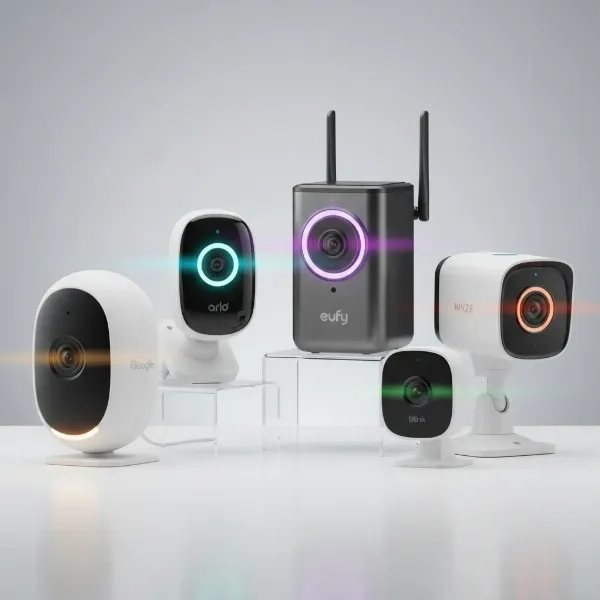 A collection of the best outdoor security cameras on display, featuring models from Google Nest, Arlo, Eufy, Blink, and Wyze, highlighting their designs and features.
Outdoor Camera Installation Guide
Proper installation of your outdoor camera is crucial for optimal performance, security, and longevity. While models vary, these general steps will help you set up your surveillance system safely and effectively.
-
Choose the Right Location:
- Strategic Coverage: Position cameras to cover key areas like main entrances, driveways, backyards, and vulnerable windows. Aim for overlapping fields of view if using multiple cameras.
- Height: Mount cameras 8-10 feet (2.5-3 meters) above ground. This is high enough to deter tampering and provide a wide view, yet low enough for clear facial recognition.
- Lighting: Avoid direct sunlight into the lens, which can cause glare. Consider areas with existing external lighting for better night vision or use cameras with built-in spotlights.
- Obstructions: Ensure there are no trees, bushes, or other objects that could block the view, trigger false alarms, or be used by intruders to hide.
- Connectivity (for wireless): Check Wi-Fi signal strength at the intended mounting spot using your phone. For wired cameras, plan cable routes carefully.
-
Gather Necessary Tools:
- Drill and appropriate drill bits (for mounting brackets).
- Screwdriver set.
- Ladder.
- Pencil for marking.
- Measuring tape.
- Cable ties or clips (for wired cameras).
- Wire strippers/crimpers (for wired setups if needed).
-
Mount the Camera:
- Attach the mounting bracket to the chosen surface (wall, eaves, pole) using screws. Ensure it’s firmly secured.
- Attach the camera to the bracket.
- Pro Tip: Temporarily mount the camera and use the live view on your smartphone to fine-tune the angle before final tightening.
-
Connect Power and Network:
- Wireless (Battery/Solar): Simply ensure the battery is charged or the solar panel is positioned for maximum sunlight. The camera connects to your Wi-Fi network during initial setup via an app.
- Wired (Analog/IP): Run power cables to an outlet or use Power over Ethernet (PoE) if supported. Connect data cables (coaxial for analog, Ethernet for IP) to your DVR/NVR or network switch. Secure all cables to prevent damage or tampering.
-
Configure and Test:
- App Setup: Download the manufacturer’s app and follow the on-screen instructions to connect the camera to your network and account.
- Settings: Customize motion detection zones, sensitivity levels, recording schedules, and alert preferences.
- Live View & Playback: Verify that the live feed is clear and that recordings are properly stored. Test night vision.
- Two-Way Audio: If available, test the microphone and speaker functionality.
- Alerts: Trigger motion in the camera’s view to ensure you receive notifications on your device.
By following these steps, you can ensure your outdoor camera is installed correctly, providing robust and reliable surveillance for your property.
Tips for Using and Maintaining Outdoor Cameras
To ensure your outdoor cameras provide continuous, high-quality surveillance and a long operational life, regular usage and maintenance are key. Consistent care prevents common issues and maximizes your security investment.
- Regular Cleaning: Dust, dirt, cobwebs, rain streaks, and even bird droppings can accumulate on camera lenses and housings, obscuring the view. Gently clean the lens with a soft, damp cloth (microfiber is ideal) to avoid scratches, and wipe down the camera body every few months, or more frequently in dusty or pollen-heavy environments.
- Check Connections and Power: For wired cameras, periodically inspect cables for fraying, cuts, or loose connections that could interrupt power or data transmission. Ensure plugs are secure and waterproofed where necessary. For battery-powered wireless cameras, regularly monitor battery levels via the app and recharge or replace them as needed. If using solar panels, ensure they are clean and free from obstructions like leaves or snow that could block sunlight.
- Update Firmware: Camera manufacturers frequently release firmware updates that improve performance, add new features, enhance security, and fix bugs. Always install these updates promptly through your camera’s mobile app or web interface to keep your system running optimally and secure against vulnerabilities.
- Protect from Physical Impacts: While outdoor cameras are built to be durable and weather-resistant, extreme conditions or accidental impacts can still cause damage. If possible, consider installing cameras under eaves or protective covers to shield them further from harsh direct sunlight, heavy rain, or hail. Ensure they are mounted securely to prevent strong winds from dislodging them.
- Review Settings Regularly: Periodically check your camera’s settings. Adjust motion detection sensitivity to minimize false alarms from swaying trees or small animals while ensuring genuine threats are captured. Verify that recording schedules, activity zones, and alert preferences are still aligned with your security needs.
- Backup Footage: For systems with local storage (SD cards or NVRs), regularly back up important footage to an external hard drive or cloud service. This safeguards against data loss if the local storage device fails or is stolen.
By dedicating a small amount of time to these usage and maintenance tips, you can significantly extend the lifespan of your outdoor cameras and ensure they remain a reliable sentinel for your property.
Buying Guide: What You Need to Know Before Buying an Outdoor Camera
Before making a purchase, a strategic approach will ensure you invest in an outdoor camera system that truly meets your needs and provides lasting security. Here’s a comprehensive buying guide to help you navigate the choices.
- Determine Your Budget: Outdoor cameras range widely in price, from budget-friendly options under $100 to premium systems costing several hundred dollars, often with additional subscription fees. Establish a realistic budget that includes not just the camera but also any necessary accessories (e.g., solar panels, extra batteries) and potential ongoing cloud storage costs. Remember that while a higher price often correlates with more features and better quality, excellent value can be found across all price points.
- Identify Your Specific Needs:
- Area Coverage: Do you need to monitor a small entryway, a sprawling backyard, or a commercial loading dock? This impacts the required field of view, whether you need PTZ capabilities, and the number of cameras.
- Threat Detection: Are you primarily concerned with human intruders, or do you also need to monitor pets, vehicles, or package deliveries? This dictates the level of AI-powered smart detection features you’ll need.
- Lighting Conditions: Assess typical lighting in the area, especially at night. This will determine the importance of strong IR night vision, color night vision, or integrated spotlights.
- Connectivity: Do you have reliable outdoor Wi-Fi, or will you need a cellular-based camera for areas without network access?
- Power Access: Is there an accessible power outlet, or do you need a battery-powered or solar-charged wireless solution?
- Prioritize Essential Features: Based on your needs, make a list of “must-have” features (e.g., 2K resolution, IP66 weather rating, two-way audio) and “nice-to-have” features (e.g., facial recognition, advanced siren options). Don’t overpay for features you won’t use.
- Research Reputable Brands: Stick to well-known brands with a proven track record for security, reliability, and customer support. Brands like Google Nest, Arlo, Eufy, Ring, Blink, and Wyze are popular choices with extensive product lines.
- Consider System Ecosystems: If you already own smart home devices (e.g., Google Home, Alexa), consider cameras that seamlessly integrate into that ecosystem for centralized control and enhanced automation (e.g., lights turning on when motion is detected).
- Evaluate Warranty and Support: A good warranty provides peace of mind. Check the manufacturer’s warranty period and read reviews about their customer support quality. Easy access to technical assistance can be invaluable if you encounter setup or operational issues.
- Privacy and Data Security: Understand how your data is stored and protected. Look for cameras with encrypted local storage options and secure cloud services. Review the company’s privacy policy to ensure your video footage is handled responsibly.
By thoroughly considering these points, you can confidently choose an outdoor camera system that offers robust, tailored security for your property, providing the vigilance and control that traditional manual systems simply cannot match.
Conclusion
Modern outdoor cameras represent a pivotal advancement in security, offering unprecedented levels of vigilance and control over your property’s perimeter. Far more sophisticated than outdated manual systems, these devices combine high-definition video, advanced night vision, and intelligent AI features to deter threats, capture critical evidence, and provide real-time alerts. From weather-resistant designs to flexible power options and smart home integration, today’s outdoor cameras cater to every need and budget, ensuring that whether you’re at home or away, you remain connected and protected.
The process of selecting the right outdoor camera involves carefully weighing resolution, field of view, weather resilience, and smart functionalities against your specific security requirements. With leading brands continually innovating, the power to create a truly secure environment is more accessible than ever before. Are you ready to upgrade your security and experience the peace of mind that a smart outdoor camera system provides?
Frequently Asked Questions
What resolution is best for an outdoor security camera?
For clear identification of faces and license plates, a minimum of 1080p (Full HD) is recommended. However, for superior detail and better digital zoom capabilities, 2K (Quad HD) or 4K (Ultra HD) resolutions offer significant advantages, especially for larger outdoor areas.
Do all outdoor cameras have night vision?
Most modern outdoor security cameras include some form of night vision, typically infrared (IR) for black-and-white footage in darkness. More advanced models may offer color night vision, often achieved through built-in spotlights or highly sensitive sensors, for richer detail at night.
How do I protect my outdoor camera from extreme weather?
Outdoor cameras are designed with weather-resistant housings, often indicated by an IP (Ingress Protection) rating like IP65 or IP66. To further protect them, consider mounting them under eaves, overhangs, or using optional weather shields. Always ensure the camera’s operating temperature range matches your climate.
Can outdoor cameras work without Wi-Fi?
Yes, some outdoor cameras can operate without a constant Wi-Fi connection. Cellular (LTE) cameras use a mobile data plan to transmit video, making them ideal for remote locations. Additionally, some cameras offer local storage (SD card) and can record footage even if the Wi-Fi connection is temporarily lost.
Are outdoor security cameras difficult to install?
Installation difficulty varies. Battery-powered wireless cameras are generally the easiest to install, offering flexible placement without extensive wiring. Wired cameras, especially complex IP or PoE systems, may require more technical skill or professional installation due to cabling requirements for power and data.
Do I need a subscription for my outdoor camera?
Many outdoor cameras offer basic functionalities (live view, motion alerts) without a subscription. However, features like cloud video storage, extended video history, advanced AI detection (e.g., facial recognition), and professional monitoring often require a paid monthly or annual subscription service. Always check the brand’s subscription model.
How often do battery-powered outdoor cameras need to be recharged?
The battery life of wireless outdoor cameras varies significantly based on usage, motion detection frequency, video recording length, and environmental temperature. Some cameras can last several months to even a year or two on a single charge, while others may need recharging every few weeks. Solar panel accessories can often extend battery life indefinitely.